
I have watched The Social Dilemma a few times now but each time I do, I get as equally freaked out. On the surface, the social web has influenced society in a few positive ways such as connecting people from across the world, and allowing family members to keep up with each other's lives easier.... Continue Reading →
Category Archives: EC&I 833
Beyond the Classroom : Rise of Education 3.0
Today’s presentation has given me a new perspective about Education 3.0. The transformation of Education from 1.0 to 3.0 sheds light on the learner-driven concept where students are allowed to set their own learning objectives and become self-determined. Jackie Gerstein has compared the evolution of the Web from 1.0 to 3.0 with the drastic revolution of education from 1.0 to 3.0. This metaphor captures the whole new version of education- 3.0 which emphasised on various skills like critical thinking, creativity, 21 century skills and highly personalised and child centered learning environment. If we think about what an Education 3.0 classroom looks like, imagine a room in which students might have the full right to choose and pursue self-directed learning path. This approach not only emphasises critical thinking and creativity but also help the educators to meet the diverse needs of the students in the real world.
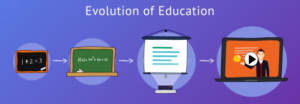
The radical shift of the Web from 1.0 to 3.0 in education have both positive and difficult implications. This shift have not only focused on personalized learning through various flexible learning platforms that involve AI but also making sure that the course material is relevant and easily accessible to meet the diverse needs of individuals. Thus, I believe this drastic change have brought easy access to open and global knowledge, allowing students from different environments to connect with diverse resources and communities.
However, I think there are some disparities such as those students who have easy access to latest technologies and digital literacy will thrive, while those who lack these resources, they may have to face various limitations in educational engagement and access to comprehension . For example, especially rural and underserved communities, may suffer shortcomings in a 3.0 educational setting without sufficient digital infrastructure and skills training.
The teachers who will be privileged by this change are those who are technology freaks and proficient in using digital tools. Just like me, I love using advanced digital tools to design and manage my work and make my learning better. We can enhance the educational experience by integrating technology, also fostering more engaging and creative learning environments for our kids. The students who will get disadvantage from the advancement of Education 3.0 are those who belong to marginalised groups as they have limited access to the technology yet the educators are advocating for the policies and infrastructure that promotes inclusivity and educational equity in the education 3.0 model and benefits everyone equally.
References :
Web 1.0 to 3.0 and its relation in transitioning Education 1.0 to 3.0
This week’s presentation was eye-opening on the emergence of Web 1.0 and Web 2.0 and how these World Wide Web versions have significantly transformed our virtual interaction process. In the presentation, Raul described Web 1.0 as a “static web or read-only web characterized by its simplicity, limited interactivity, tendency of static content and one mode of transmission ”. In Web 1.0, teachers could transfer educational content to the learner by using easy-to-access, visualized techniques where learners are passive recipients of knowledge, and all they do is listen to the teacher, take notes and respond to assessments verbatim as the teacher taught them (Gerstein, 2014). Learning was teacher-centred, and dissemination of knowledge was one-directional.
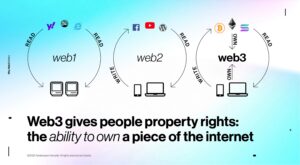 Further in the presentation, Stacey explained the transformation of Web 1.0 to 2.0 as introducing more collaborative websites and applications and generating content-sharing platforms like Wikipedia, blogs, and social media, which have become a part of most people’s lives. This technology was characterized by its increased bandwidth, better online browsers, online data storage, cloud computing, etc. The transformation of the interactive nature of Web 2.0 tools can also be likened to how relationships between students and teachers are being established in Education 2.0. According to Gerstein, this transformation has brought about the use of innovative pedagogical strategies like project-based learning, inquiry-based learning, and cooperative learning with the use of collaborative and interactive platforms. Teachers are considered facilitators of knowledge in this context, even if they still remain the custodians of knowledge. Unfortunately, some teachers are still struggling to implement these innovative pedagogies in their classroom practices. The use of Web 2.0 tools gives learners the opportunity to become contributors of knowledge, have opinions on educational dialogues, be active in their learning, and get the opportunity to collaborate and share ideas.
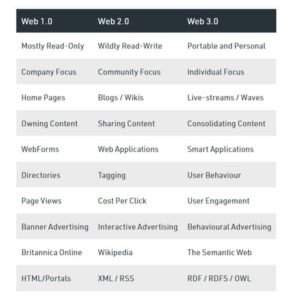
Differences Between Web 1.0, 2.0 and 3.0 Image via geeksforgeeks
Looking at the emergence of advanced learning technologies and their features, one can say that there is an ongoing transition from Web 2.0 to 3.0. This is characterized by the ability to combine and integrate web content and services into existing Web 2.0 platforms with the aim of improving the end-user experience. This transition can be seen in how open resources are being used in online learning platforms. According to Gerstein (2014), Education 3.0 reimagines learning as a participatory and networked process, emphasizing the integration of technology and student-driven learning with the aim of promoting inclusive learning and cultivating a culture of lifelong and learner-centric knowledge production, which can help foster human-capital development. The transformative impact of Web 3.0 on education, as indicated by Garstein (2014), is characterized by its personalized, participatory, and interactive nature. With Web 3.0, education becomes highly adaptive, as technologies such as artificial intelligence and the Semantic Web enable tailored learning experiences that meet individual student needs.
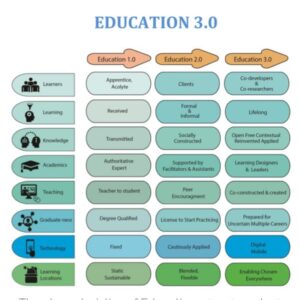
http://www.gillysalmon.com/blog/higher-education-3-0-and-beyond
According to Gerstein, this environment privileges students who are digitally literate, self-directed, and comfortable with autonomous learning processes, as Web 3.0 emphasizes student agency and resourcefulness. However, this shift also raises concerns about accessibility and equity. Students and teachers who lack technological fluency or reliable access to digital resources may find themselves at a disadvantage, potentially widening the digital divide.Several studies have shown that Web 3.0’s tools can serve as personal learning assistants, which is beneficial for learners who can actively navigate and leverage these technologies. However, those that are less familiar with digital platforms may struggle. I think it is crucial to approach Web 3.0 resources with discernment and critical engagement, especially for students and teachers that lack media literacy skills, to mitigate potential drawbacks. As Stacey indicated, because of Web 2.0 and 3.0, developing the digital literacy skills of students is very crucial .
Adapting digital tools to our teaching styles
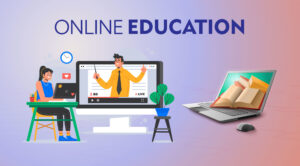 Online and blended learning have become a crucial part of the education system after the outbreak of the covid pandemic. There are numerous tools that are adopted by educators at different levels to enhance the teaching and learning outcomes and these tools are not only becoming a part of our lives but now also cater to the unique difficulties of accessibility, engagement, the curriculum planning and delivery in a diverse educational settings. During my teaching practice, I was familiar with multiple tools like zoom, Microsoft teams, Kahoot, Moodle and google classroom that highly encourage interactive and collaborative learning in my classroom. Many digital tools have offered personalised instructions based on the individual’s learning styles that really helped my students to grasp the content more thoroughly and avoided the one-size fits all strategy.
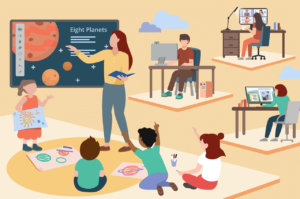
In the case of the teachers, these tools are not only effective but also creative, and responsive to fulfil the diverse needs of the students, while these tools also focus on the teacher’s professional development. For instance, Google classrooms have a package of advantages that helps in managing all the administrative work that teachers have to do such as providing grades, tracking student progress, communication with parents or assigning homework.
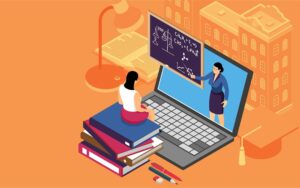 I have experience of both offline and online teaching practice. While I was teaching in person, it was quite a difficult task for us to incorporate useful digital tools into the teaching pedagogies due to various factors like time constraints and a lack of adequate resources by the organisation in the classroom. However, when the pandemic hit really hard, the education system drastically shifted to online settings, and digital learning became a prominent part of the educational system. This transition significantly enhanced not only my teaching and learning experience but also my students’ learning experience too.
Using platforms like Moodle and google classroom have been very valuable and transformed my teaching practice as they allowed me to organise my course content, all students assignments, provide real-time feedback and provide them grades efficiently. Additionally, integrating tools such as Zoom particularly for the live sessions and Google Docs for collective learning projects has fostered greater engagement, team work and interaction among my students. This shift have made learning more accessible and have shown me the importance of being adaptable to digital tools to enhance educational practices and encouraged me to explore innovative teaching method
References:
Tools for Distance and Online Education
I teach in person in a classroom. I haven’t had to teach online since 2020. If we were to switch suddenly back to online learning, I would feel comfortable using some of the online tools we heard about in the presentation and readings this week, but I don’t think that the classroom experience can be... Continue Reading →
Using online learning technology and tools for distance education.
This week’s lesson was on tools for online and distance learning. Just as the presenters indicated during the section, distance or online education encompasses various methods of delivering educational content remotely, primarily through digital technologies and the Internet. The presenters also talked about how the use of online learning in distance education reflects the social constructivist principles of learning through social interaction and discussion.
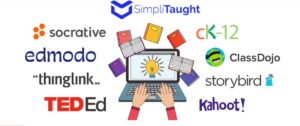
Image from https://blog.simplitaught.com/online-learning-tools/
This approach has gained prominence, especially during the COVID-19 pandemic, as it allows for flexible learning opportunities while overcoming geographical barriers. Reflecting on my own context as a teacher educator, I have had the opportunity of using Blackboard Collaborate as a Learning Management System (LMS) and Microsoft Teams for blended and online learning. These two tools were recommended for use by the institution, and I find them very useful. Just as indicated in one of the provided resources, using Microsoft Teams for education offers a user-friendly interface and collaborative features that facilitate lively interaction among students and teachers. This fosters effective communication and enhances learning outcomes. The Microsoft Teams application also provides seamless access to cloud storage folders like OneDrive and tools like Word and Excel. The application also provides the opportunity to create and manage team sessions and assignments and integrate additional productivity tools like forms, polls, Kahoot, and YouTube videos to enhance learning. Another reason I like this Microsoft Teams tool is that I find it very easy to share and work together on documents with colleagues in real life, and it also has chat features that can be used as a discussion board.

This Photo by Unknown Author is licensed under CC BY-SA
Reflecting on how Black Collaborate was used, I remembered that the platform allows lecturers to upload content, and students could download, watch, or playback these contents at their own convenience. So students are able to control the space at which they learn; even after the lecture has been completed, they can go back to access the lesson recordings and additional reading materials provided for the course. I think this also helps students to sometimes have the autonomy of pausing and reflecting on their learning before moving into the next phase of their self study. In addition, the collaborate platform also allows students to do online formative and summative assessments. Reflecting on the lesson presentation, issues related to access to these tools and how they could impact learning were discussed. I think everything in life comes with benefits and challenges, and as individuals, we are to choose what we desire. Based on the context of where I have used these tools, the institution provides free access to the tools provided students are using the registered institution’s ID. Nevertheless, the issue of broadband and sometimes the cost of getting network connectivity has always played out just as discussed during the presentation, and I think that cannot be changed. However, I think these online learning tools have made distance education more accessible for students, even in remote areas.
Th influence of productivity suites and development of 21st century skills
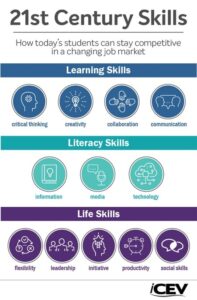
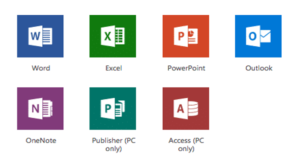 The lesson presented in the 5th class was an important one that focused on various application programs that can be used in today’s digital world. Ayushi, Gagan, and Mohammad did an excellent presentation on productivity suites, and presentation tools. The presenters elaborated much on the importance of these tools and how they become essential parts of our lives. In one of the resources shared by the presenters, productivity suites were described as a suite of tools designed to streamline tasks and boost output, including applications for creating documents, databases, graphs, spreadsheets, and presentations. While its core focus is on enhancing efficiency, the term is often expanded to include any software used in our personal and professional lives to assist us in communicating, collaborating, planning, and getting work done. According to the presenters and other existing literature, productivity suites play a pivotal role in enhancing digital literacy and 21st-century skills among students, equipping them for future workforce demands. Voogt and Roblin (2010) described 21st century skills “as an overarching concept for the knowledge, skills, and dispositions citizens need to be able to contribute to the knowledge society” (p. 1).
https://www.icevonline.com/blog/what-are-21st-century-skills
Reflecting on my experience in the use of productivity tools and softwares like Canvas, PowerPoint, Prezi, Animoto, Google documents, and Microsoft Office, and looking at the list of these skills as outlined in the figure below, I can say that indeed using these tools has in one way or another helped me develop essential competencies that are vital in today’s interconnected world. As an educator, I think integrating productivity suites into learning not only facilitates academic growth but also prepares students for real-world challenges. We live in a world where technology has enabled students to become active participants and creators in classrooms. Using productivity suites like word documents PowerPoint, even AI embedded platforms like Dale, and so on is empowering students to become active creators, which in turn helps develop their digital literacy. As an educator, I have seen students work together on projects and assignments, communicate and collaborate through sending of emails or sharing of documents. All these are characteristics of 21st century skills, and the only way they were able to exhibit this was through the use of these Microsoft tools. There are also some hands on activities and online platforms that have been tailored for young children to learn so as to establish a foundation for developing their digital skills. Due to the technology-driven environment we find ourselves in, it has become essential that every individual be digitally literate, and this is very essential in addition to the 21st century skills. So even people don’t want to embed themselves in the world of technology; it seems most employers now look for people that can solve problems using basic Microsoft Office programs, which I think can only be developed through productivity suites.
Looking at the gaps they leave, Orta (2019) identified substantial disparities in digital skills among students from diverse socioeconomic backgrounds, emphasizing the importance of equitable access to technology and effective digital teaching methods.In addition, Ramamonjisoa (2024) argued that the use of productivity suites may not fully address the complexities of social-emotional learning and global citizenship, which are vital for the holistic development of students.
Productivity suites
Productivity suites plays a vital role in 21st century education sector. It has been integrated at different levels in education sector from pre-primary to high school. In pre-primary we use these productivity suites to make different worksheets for the students. As a teacher these tools help us to work together on one document while sitting at different locations as per our convenience. Tools such as google docs, google spread sheet help us to prepare results of the student. These tools help us to work together but at our comfort level because we can work wherever and whenever we want as per our schedule. As a students these tools help the students to make their learning more engaging and interactive. Tools such as power point presentation, Prezi present the content in such a manner that attracts the learner attention and engage them in the learning process because as we all know that the students will learn better by observing and viewing the things rather than just listening.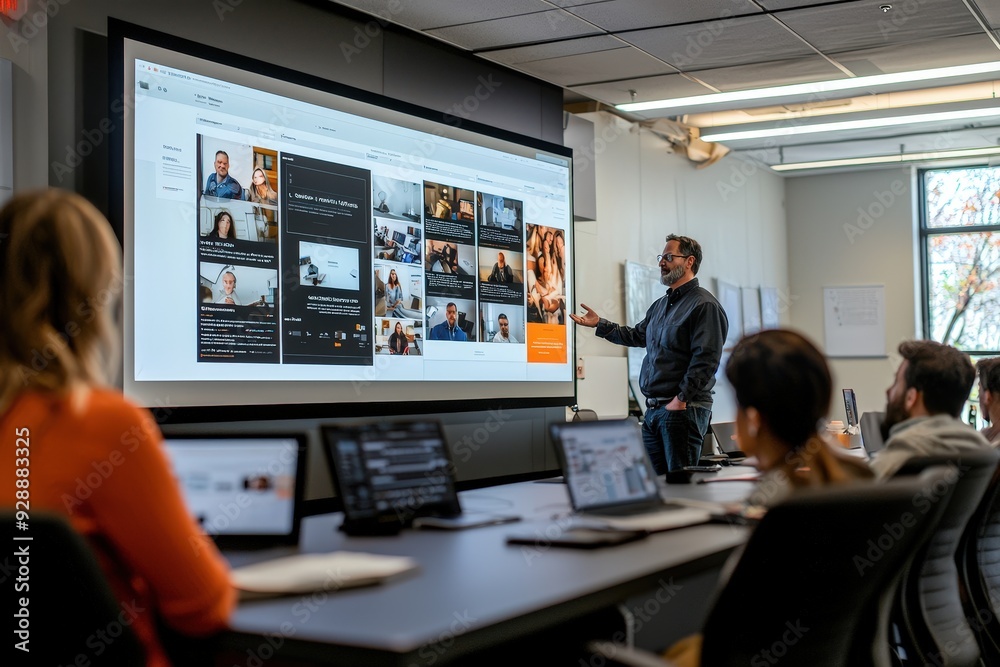 These productivity tools play a vital role in developing various skills that are required by the students in 21st century. As we all are familiar with the fact that the present and the future era is all about technology so it is very important that the students should have the knowledge of these tools to have a successful career in future. This learning process need to be upgraded as per the advancement in the technology so that there should not be any gap between their learning phase and working phase in future. However, one should use the productivity suites wisely as over reliance on technology may affect our thinking power and reduce our creativity and efficiency. So, one should know how to use these tools effectively to increase our productivity and should not have any negative effect on us.
Productivity Suites
A productivity suite is “A set of applications that generally includes at least a word processing, spreadsheet and presentation graphics program.” Productivity suites have been around for longer than you may think. In 1983, Lotus Symphony was launched as the “first fully integrated productivity suite.” Microsoft office became popular in the 1990’s and has remained... Continue Reading →
“Amalgamation of Productivity suites into Educational settings”
How have productivity suites been integrated into educational settings at different levels (K-12, higher education, etc.)? Reflect on their accessibility for students, teachers, and institutions. How do these tools address or exacerbate issues related to digital divide and equity?

Productivity suites, such as Microsoft Office 365, Google Workspace, and Apple’s iWork, have been integrated in the educational settings to enhance the better learning experiences among the students. Their amalgamation varies across K-12 and higher education and results in enriched collective learning among students and better administrative efficiency. At the K-12 level, productivity suites have been merged into both classroom settings and administrative work in order to support teachers, learners, and school management.
In K-12 Educational settings,
Integration of Productivity suites in Educational settings :

Collaborative Learning: Productivity suites are often used to foster collective learning among students. The K-12 Students use tools like Google Docs or Microsoft Word for writing, formatting or editing different assignments, projects, and essays simultaneously regardless of physical location. Teachers can also provide real-time feedback or track progress using comments or chat boxes without waiting for the assignment to end.
Administrative Use: Teachers use productivity tools for curriculum planning, marking grades, and communication with parents and students. For example, Google Classroom is a versatile platform that enhances appropriate organisation, communication, and collaboration while promoting a more interactive and accessible learning experience for students.
Student Engagement: Platforms like Microsoft OneNote or Google Keep allow students to take digital notes, see course materials, this helps them to stay organised and up to date in the classroom and access to various resources . These tools encourage self-paced learning and personalized content management.
Accessibility for students, teachers and institutions
- For Students: In K-12 settings, especially in schools with limited resources, ensuring that all students have access to the necessary technology and productivity software can be a challenge. However, initiatives like Google’s free suite for education and discounted Microsoft Office 365 accounts help bridge the gap. Some schools implement device lending programs or use Chromebooks to ensure students have access to productivity software.
- For Teachers: Professional development is crucial to ensure that teachers are comfortable using these tools. Many districts offer workshops and training to ensure teachers can effectively integrate these tools into their classrooms.
- For Institutions: Schools may face budget constraints when implementing comprehensive productivity suites. However, cloud-based services have made it easier for institutions to adopt and scale these tools, often offering them for free or at a reduced cost.

Addressing the issues like Digital Divide and Equity
The widespread adoption of productivity suites in education highlights issues related to the digital divide, particularly around access to reliable devices and internet connectivity.
- Access to Devices: Many educational institutions provide students with laptops, tablets, or Chromebooks to ensure that they can access productivity suites and other digital tools. However, this is not always feasible in underfunded districts, creating gaps in access.
- Internet Access: Students in rural or economically disadvantaged areas often face challenges in accessing reliable high-speed internet, limiting their ability to participate in online learning or collaborate effectively using cloud-based tools.
- Teacher Training: Teachers and faculty need continuous training to use productivity suites effectively in their instruction. Institutions with fewer resources may struggle to offer comprehensive professional development, widening the gap in the effective use of these tools.
In conclusion, The integration of productivity suites in education has revolutionized teaching, learning, and administration, making them essential tools at every level, from K-12 to higher education. These tools foster collaboration, digital literacy, and flexibility in learning, but challenges related to digital equity and the digital divide persist.
