Generative AI and Education

This week is another wonderful presentation on generative AI by Garry, Ryan, and Mitch. The use of AI and Gen AI is a topic of the century, and several debates are ongoing about its pervasiveness in our everyday lives, particularly in education. In the presentation, Garry defined AI, according to Stryker and Kavlakoglu (2024), as ‘technology that enables computers and machines to simulate human learning, comprehension, problem-solving, decision-making, creativity, and autonomy. Referring to today’s presentation, generative AI is viewed as a subset of AI tools like generative pre-trained transformers that use neural networks, genetic algorithms, natural language processes, machine learning, robotics, and deep learning models to create content, images, audio, etc. The article Advantages and Disadvantages of AI in Education by Clugston (2019) describes the use of AI in education as leveraging various computer system tools to simulate human intelligence that can help improve learning experiences, streamline administrative tasks, and support educators.

Generative AI Image
Source: Canvas

The article further highlighted the benefits of AI in education to include tailoring education to individual student needs, optimizing learning outcomes, automating routine tasks, freeing up teachers’ time for more impactful instructional activities, analyzing student performance data to identify areas of strength and weakness, and allowing for timely interventions and support, creating more interactive and engaging learning experiences for students, capturing students’ attention, optimizing the allocation of resources, and ensuring they are used effectively.

Though the use of AI and its subforms offers significant benefits in enhancing learning opportunities, these tools also come with several challenges, like students becoming too dependent on them, which in turn could diminish the ability to think critically. I am not really concerned about what people say regarding its use for cheating because I feel teachers should be able to come up with better activities and strategies that can make students engage with the use of AI while developing other essential skills that are needed for thriving in the changing world of work. Its kind of funny how we are made to believe that these tools are free, whereas most of the free tools/platforms have limited functionality and may sometimes collect sensitive data from users, which is sometimes not protected and sold to the parties for marketing purposes. I have also noted that there are  ongoing concerns about the use of AI tools, particularly in K-12 settings. However, just like every other technology, I think we should have a clear pedagogical purpose for its integration in our lessons and classroom. Today’s presentation highlighted the importance of considering a tool’s user-friendliness and perceived usefulness, as outlined in the Technology Acceptance Model (1989), when deciding on its adoption.

Image

Technology Acceptance Model (Davis, 1989)

Based on these two constructs of usefulness and ease of use, I have found myself using AI paraphrasing tools more for constructive, concise, and coherent writing and argument. I have also used In Video AI to help in creating videos for some of the work I do. The fact remains that AI is an enduring technology, much like some social media platforms in their early days. While initial concerns existed, many social media platforms have become obsolete or less popular over time. Similarly, I think AI platforms that fail to meet user needs may eventually become irrelevant and fade away. However, I think the skills that students can develop when using artificial intelligence can open doors to careers in various rapidly evolving fields such as smartphone technology, supply chain automation, fraud prevention, energy management, e-commerce, email spam filtering, and medical diagnosis (Northumbria University). Its very concerning when teachers say they are not interested in these tools or even technology, considering that our students are tech-savvy. I think for educators to remain effective and relevant in today’s world of technology, its important we familiarize ourselves with the latest technological innovations and their educational applications. By embracing and promoting emerging technologies, we can ensure that technology enhances, rather than replacing our role as educators.

Example of AI Avatar in an Engage VR platform (Source: https://www.linkedin.com/posts/craigfrehlich_do-you-remember-when-you-first-were-learning-activity-7265843788223246336–J-W/?utm_source=share&utm_medium=member_desktop)
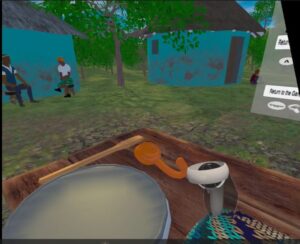
Cultural Anchor Virtual Reality on preserving the African Indigenous knowledge


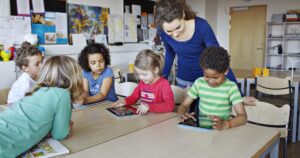
Talking about AI, particularly its integration into emerging technologies like augmented reality and virtual reality, the first image to the left is the work of Prof. Craig Frehlich  on how AI tutors within VR can help enhance immersive learning. It’s actually a video, but I just took the screenshot. The second image is actually part of a Culturally Anchored Virtual Reality Simulations (CAVARS) project my team in South Africa developed for teaching fermentation in science. This VR app actually makes students go through the brewing process of the traditional Nkombothi and engage in the step-by-step process of how fermentation occurs when making this traditional beer. Here is a link to how the team is utilizing AR and VR at UJ for teaching preservice teachers. Another example below is how AR can also be used in teaching.

I feel the future of AI in our lives, particularly in education, is going to bridge a lot of gaps in how students learn abstract concepts. I feel it is also going to make learning more real and relevant to societal needs. Yes, there are challenges, and there will always be challenges, just like everything in life has its positive and negative. However, I feel  we just have to embrace it and focus more on the benefits.

References

Clugston, B. (2024). Advantages and disadvantages of AI in education | University Canada West (UCW)

Davis, F. D. (1989), “Perceived usefulness, perceived ease of use, and user acceptance of information technology”, MIS Quarterly13 (3): 319–340, doi:10.2307/249008JSTOR 249008S2CID 12476939

Stryker, C. & Kavlakoglu, E. (2024). What is AI? Available at https://www.ibm.com/topics/artificial-intelligence
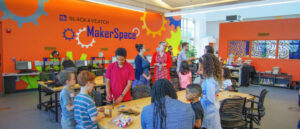
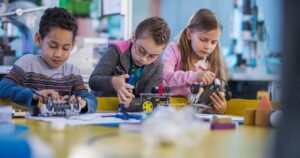
Makerspaces matter : A gateway to 21 century skills 

Makerspaces or coding have transformed our entire education system into innovative space, whereas preparing our students to be lifelong learners and problem solvers by emphasizing on creativity, collaboration, and innovation. They have given students a platform to explore STEAM concepts (science, technology, engineering, art, and math) through various hands-on activities. Going through this week’s readings have given me unique insights about how makerspaces or coding can have a meaningful and lasting impact on students.  

When I was working as an Educator I introduced Makerspace/coding through different project-based activities like simple available materials so that students can actively participate in their learning journey and apply their knowledge to the real world settings. In my science classroom, I allotted students to create models or projects in order to showcase the scientific concepts such as ecosystem projects or circuits. I believe these activities have built up abstract thinking and fosters critical thinking, problem solving skills and the collaboration skills. Moreover, beyond the theoretical knowledge the makerspace/coding teach them how to be resilient and prepare them for the real world challenges they will face in life. 

Considering whether all the students get benefit or not from the makerspace/coding, I would say, it benefits most of the students. As, some students might face barriers because of various factors like lack of confidence or their interest and inequitable access to the resources. During my teaching practice in the rural region of India, I noticed that students who belong to the underprivileged backgrounds were often lacking in the confidence to experiment freely or they have limited access to useful resources. They were more comfortable in structured, teacher-led instruction and found makerspace or coding involved learning pedagogy more intimidating. But later I have observed that the students who were hesitant before were developing confidence and involved actively in the classroom because of the positive motivation and a supportive environment. Thus, this emphasizes on the importance of inclusivity and differentiated support in makerspaces to ensure all students benefit.

In my experience, I have discovered that a makerspace does not really depend on advanced technology or some expensive resources to be effective in the classroom. It requires simple materials like cardboard or charts to give students hands-on exposure to foster creativity, curiosity and active engagement. I remember when I gave my students a project to prepare solar ovens where they used cardboard, aluminium foil and plastic wrap to construct this model. This activity not only taught them about the scientific concept behind the solar oven but also encouraged them to enhance their collaboration and critical thinking skills. 

I am not in favor of this thought that only “techies” can teach makerspaces. Any Educator can teach and integrate makerspace in their teaching practice. I have collaborated with various teachers who were having very little knowledge about the technology or makerspace initially but they were willing to learn and adapt this hands-on approach into their pedagogy to give students a space where they can grow and build 21 century skills over time. 


References :

https://www.trceducation.com/stem-robotics-coding-and-maker-spaces

https://www.raspberrypi.org/app/uploads/2021/11/Teaching-programming-in-schools-pedagogy-review-Raspberry-Pi-Foundation.pdf

The place of Coding and Makerspace in Education

This week was another discussion on coding and makerspace. A code, as described by Phillip Auerswald (2016), can be a set of instructions or rules for machines or humans. In computer science education, coding involves creating these instructions (list of rules) often written as a programming language to control a computer’s behavior, perform a sequence of instructions, repeat a sequence of instructions a prescribed number of times, and test whether a sequence was performed correctly until the specific outcome is achieved (The Conversation, May 2015).

Makerspace, on the other hand, is an open space inside a school, library or separate public/private facility that allows people of common interest to work together to think, design, create, learn, explore and share thoughts, ideas, questions and projects around specific topics of importance that use high-technology tools. The space allows people to work across different disciplines, including science, technology, engineering, mathematics, health sciences, hobbies, arts/crafts, and many more. My post today will focus more on coding.

The importance of teaching Coding to students

The continuous integration of technology into our everyday lives has advocated coding as a fundamental skill for students to function in a digital and information-driven world, apply computational skills, and transfer these skills to solve everyday problems (Ogegbo & Aina, 2023). Popat (2017) indicates that integrating coding into curricula is not just about teaching students to code but also to help them develop collaborative skills, problem-solving skills, and critical thinking skills that are essential for success in the 21st century and various academic disciplines. Furthermore, coding is regarded as an employable skill that teaches students to take risks and think logically while being empowered to fail in a safe environment. These skills are considered to be vital in all curricular areas as well as learning skills and work habits. Coding empowers students to be content creators rather than just content consumers. Teaching coding as a social practice can inspire students to use their skills to address real-world challenges and contribute to their communities (Popat, 2017).

There are some of us that think coding is meant for high school students or adults and not children. This ISTE video presentation by Keri Gritt basically explains why its important to teach coding even to younger children. She mentioned the fact that coding helps reinforce existing classroom concepts like sequencing, patterns, measurement, and storytelling and cultivates critical thinking, perseverance, flexibility, and teamwork. She also talked about the seamless integration of coding into curriculum, which requires a shift in teaching methods rather than adding new materials.


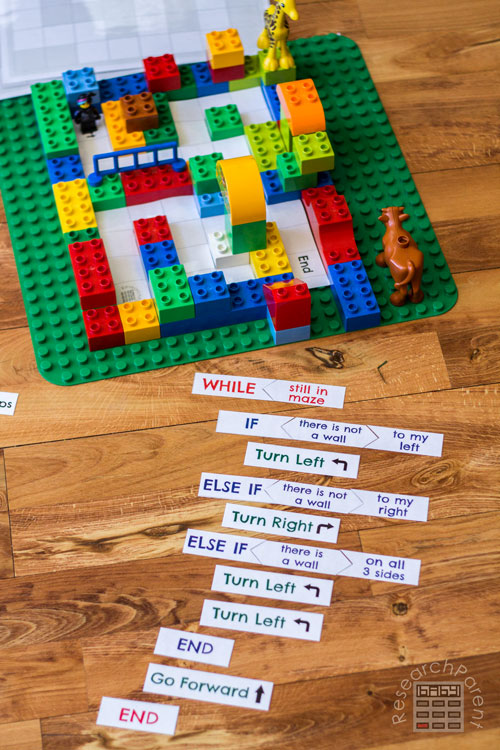
Students who engage in coding/maker space activities are actually exposed to a learning environment where they can work together in creating their own knowledge or idea of a topic/concept under the guidance of the teacher. This makes them to be highly motivated, as they are able to explore their interests and create things that they are passionate about. A typical example can be engaging young children in playing with Lego construction kits. Children can build anything of interest, and as a teacher, you can ask them to explain how they made their construction in case another person wants to replicate the same thing. In so doing, the children would give step-by-step instructions on what they had done (also known as an algorithm, which is a coding concept). During the activity, children can learn other principles like sequencing, pattern recognition, and abstraction, which can be used in solving any kind of problem.

Image copied from www.researchparent.com/coding-a-lego-maze/

Based on the values of coding, it is important as educators to provide opportunities for students to be innovative and create, and not just consume, technology.  The question of whether all students benefit from coding education is not a straight-forward answer, as it depends on various factors, including accessibility of resources to students, pedagogical approaches used by teachers, and individual learning contexts. While coding education is increasingly recognized as essential for developing computational thinking and problem-solving skills, its effectiveness can vary significantly among different student populations based on several variables, like age, experience, student accessibility, technology exposure, technical skills, and other contextual factors (Duncan et al., 2014; Ogegbo & Aina, 2023).

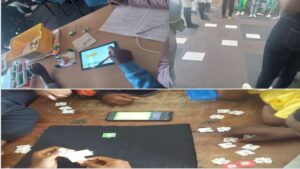
My experience as a teacher educator back in South Africa involved working with colleagues to facilitate coding and robotics workshops for students. This gave me first-hand experience on how to use both plugged and unplugged activities in teaching computational thinking concepts and practices using coding principles. Some of the activities we did during the workshop include students programming an Arduino, role-playing directions for one another to get to a particular destination, and the last one was the use of the TANKS coding app by Tangible Africa. It was initially challenging, but I had to do a lot of reading and attend several webinars to understand how those concepts are applicable to my subject area, and it took me time to be able to relate the concepts to other disciplines.

Sample of coding activities

So, should coding or makerspace be taught only by “techies?” My response would be ‘NO’. Since coding is regarded as basic literacy like math and English, then it should be taught by all teachers. I think the first thing will be demistifying coding as an approach that involves using technology., but rather see it as a pedagogical approach that can be used to promote inclusivity and enhance students interest in STEM careers. The article “An Overview of STEM, Robotics, Coding, and Maker Spaces” explains how coding activities are beginning to expand beyound curriculum and becoming a societal skill since it serves as a base for all kinds of game-based educational programs. Within the context of this article, makerspaces offer students a hands-on learning experience, allowing them to develop coding skills while exploring their creativity and problem-solving abilities. In addition, the article “Teaching-programming-in-schools-pedagogy-review-Raspberry-Pi-Foundation.pdf” outlines various strategies that teachers can use to support the integration of coding in the classroom. For instance, Kerit in the ISTE video highlighted some of the teaching methods and tools that can be used to teach coding to young children: physical sequencing of activities that help students create and follow programs using cards, understanding commands and sequencing, as well as peer activities that involve programming classmates to navigate obstacles; using robotics kits like KIBO which allows students to use barcoded blocks for coding; and Dash which allows students to use tiles to program actions (movement, sounds, lights), navigate paths, and do synchronized square dances. Based on all that has been discussed, I think non-techies should also be able to teach coding concepts in relation to their subjects. This will encourage students from various backgrounds to take an interest in the skills and break the stereotype of coding as “tech experts” alone.

As technology advances, coding will play an even more significant role in shaping the future, particularly with the growth of artificial intelligence (AI) and machine learning. I think it’s important that students are exposed to these concepts in their various subjects and disciplines with an understanding that the world is increasingly reliant on well-written code to operate smoothly.


References

Duncan, C., Bell, T., & Tanimoto, S. (2014, November). Should your 8-year-old learn coding?. In Proceedings of the 9th workshop in primary and secondary computing education (pp. 60-69).

Ogegbo, A. A., & Aina, A. Y. (2024). Exploring young students’ attitude towards coding and its relationship with STEM career interest.  Education and Information Technologies29(8), 9041-9059.

Puckket, M. (2021).  An Overview of STEM, Robotics, Coding, and Maker Spaces

Sterling, L. (2015).  An education for the 21st century means teaching coding in schools

Waite, J., & Sentance, S. (2021). Teaching programming in schools: A review of approaches and strategies. Raspberry Pi Foundation.

Assistive Technologies

What technology and/or methods have you used/could you use to make your instruction (whether Face-to-Face, blended, or online) more accessible to your students? This week's presentation helped me to remember that assistive technologies are more than computer programs or devices: "Assistive technology is an umbrella term that refers to any device or system designed to... Continue Reading →

Understanding Assistive Technologies: Uses and challenges in Education

This week was another great presentation on a different type of technology. Even though I use some of them, I have never thought of them in the way it was discussed in this class. Thanks to Katryna, Ayesha and Kelvin for the wonderful presentation. In the video “History of Assistive Technology-Part 1” by Wendy Torress, the author describes the three periods associated with the development of Assistive Technologies (AT) and explains how various laws and policies have been put in place to support people born with disabilities to be able to integrate into the community using assistive technologies. Assistive technology (AT) encompasses a range of devices, systems, or services designed to help individuals with disabilities perform functions they might otherwise find difficult, thereby promoting independence and societal inclusion. The article by Lamond and Cunnigham (2020) states that any technology that is necessary to aid a student in meeting their individual education plan (IEP) or curriculum goals is an AT. According to Young and MacCormack (2020), these technologies can range from simple tools like pencil grips to advanced software such as screen readers and braille displays, computer programs, and tablet applications that provide text-to-speech (e.g., Kurzweil 3000), speech-to-text (e.g., Dragon Naturally Speaking), word prediction capabilities (e.g., WordQ), and graphic organizers (e.g., Inspiration).

Examples of Assistive tech

Image from https://enablingdevices.com

“Assistive technology helps in two ways: it can help the student learn how to complete the task, and it can help to bypass an area of difficulty. For example, when a student decides to listen to a digital version of a book, they are bypassing an area of difficulty. However, if the student focuses on the computer screen as highlighted words are read aloud, they can learn unfamiliar words” (Young & MacCormack, 2020:p1).

I think a common assistive technology that I have used as a person is audio players and recorders, which are often built into our laptops, smartphones, and tablets. I have used these tools to help me with reading comprehension, as I sometimes prefer to listen to texts while reading an article. I remember back in my undergraduate period that whenever I went to lectures, I usually activated the voice recorder on my phone to take notes and capture lectures, which I later listened to again when doing my personal learning. Looking at the conferencing tools like Zoom and Teams, which I regularly use, these platforms have accessibility features like built-in recording, which I think can be regarded as an assistive technology for students learning online. As we can see in this class, we do have access to recordings of the class even after the discussion is over. And this gives students the opportunity to go back and listen to the discussions again, especially those  with learning differences.

Recording school lecture with voice recording pen

Image by spycentre.com/blogs

My 4-year-old son recently activated a voice-screen reader on our TV by mistake. So, every time he tries navigating various channels on the TV, he keeps hearing this voice reading whatever he pressed on the TV to his hearing. I think the scenario became very annoying for him, and he had to speak out, ‘What is this?” as he started crying. It took me a while to understand what happened, and I had to turn to Google for assistance on how to disable it. Based on the discussion we had had in this class, I realized that the software can be used to help users with disabilities, especially those with visual impairments. They can easily access programs on their TV by listening to whatever information is being displayed on their TV screen.

Speech Therapy Ideas TV

Image from speechtherapytalk.com

Though AT provide flexible learning experiences and support for students, for instance, to support learning and to bypass a challenging task such as handwriting; studies have shown that many teachers lack the necessary knowledge and technical proficiency to integrate AT into their classrooms (Lamond & Cunnigham, 2020). The integration of AT in classrooms might also be limited or hindered due to limited accessibility as a result of funding and a lack of awareness and support among teachers and school administrators (Ansari, 2023).

In today’s remote and hybrid learning environments, creative solutions are essential, and I think schools need to start collaborating with parents and service providers to meet the unique needs of each student. In light of this, Zuger (2020) outlined guidelines that teachers can consider for best practices when trying to use AT in their classrooms, which he tagged SETT for Success Framework:

  • Student—What is the functional area of concern, special needs related to the concern, and the student’s strengths, abilities, and expectations?
  • Environment—Where educators were once looking at the environment of the classroom and school building, they now need to consider the home environment. What are the arrangements and supports available there?
  • Task—What specific thing does the student need to be able to do, and what are the functional things actively involved in remote learning?
  • Toolkit—What can we use to help the student access their curriculum?

My Journey of Making Learning Accessible


My journey as an Educator began in India where my experiences shaped from the large classrooms with very limited resources to integrating technology in education to fulfil the diverse needs of the students. As a teacher, every stage in my life comes as a learning lesson. As I reflect on my teaching journey, it reminds me of all the useful strategies I used to make learning accessible for my students. There were plenty of challenges in my teaching journey  like large class size, diverse learning abilities. But with each challenge I get an opportunity to do something unique for my students in order to connect with them in meaningful ways. 

I have used multiple tools from time to time to make learning accessible for my students and it really transformed what I teach and learn by breaking down all the barriers like students with disabilities, connecting learners across the globe, or providing flexible ways to engage with content. Tools like zoom or google classroom were really helpful for my students to learn virtually during pandemic. Additionally, as I was moving forward in my career I understood how important differentiated instruction learning is. Not all students learn the same way so I adapted colourful charts and diagrams for visual learners and integrated tools like YouTube to show them videos of the concept to grasp easily. This approach not only made learning more relatable but also helped my students to understand the concepts easily. Also, by inculcating tools like Quizzes or Kahoot fun in the classroom, the excitement is unmatched. 

Today’s presentation by Kateryna, Aysha and Kevin has given me valuable insights about useful assistive technologies we can integrate in our teaching practice. I have learned about how these tools would  support students with disabilities and  also modify the learning experience for all by creating a more supportive and inclusive environment. I am excited to explore all these technologies further to make learning more accessible, engaging, and equitable for everyone.

What were your challenges in your teaching journey before and after technology? 

Let’s share and learn from each other !


Assessment Technologies

As assessment technologies become more popular in the classroom, it is important that we don’t allow them to dictate our assessment practices away from "good practice." Many digital assessment tools support practices such as multiple choice and true or false questions. Although these forms of assessment are easy to create and even easier to mark,... Continue Reading →

Using digital technologies and platforms for assessment purposes

In week 8, we had a valuable discussion on the intersection of technology and assessment. Thanks to Eddy, Latoya, and Nysa for their insightful presentation and helpful resources. Assessment is a crucial part of learning as it serves multiple roles that enhance educational outcomes. It not only measures student performance but also supports continuous improvement and informs educational decision-making. It is believed that effective assessment practices can bridge the gap between theoretical understanding and practical application, thereby fostering a more engaging learning environment.  However, assessment often feels a lot less like a conversation than like a series of “objective” numbers and scores.

Technology has become very pervasive and involved in our everyday lives, and its introduction into education is transforming classroom practices and students’ learning. Thus leading to the development of more advanced educational technology tools to support human interaction as well as enhance teachers’ technical and pedagogical skills ( Global Education Monitoring Report, 2023).  The use of technologies for assessment makes assessment authentic and can be used as a fun way to introduce students to newer information, make them feel comfortable with getting and answering a question right or wrong without necessarily having to stop the lesson and provide them with immediate feedback.

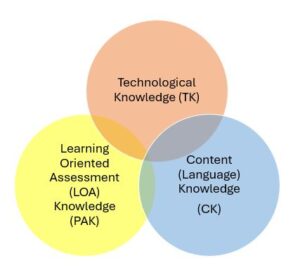
As assessment technologies become increasingly integrated into education, it’s essential to use them effectively to enhance student learning while avoiding negative cultural and social consequences. This requires careful implementation and ongoing evaluation. For example, In the video “Supporting Role of Technology in Learning-oriented Assessment”, Dr Erik Voss explains how digital technology can support teachers’ pedagogical and assessment practices. He used a similar framework to the TPACK framework to narrate how pedagogical knowledge and assessment knowledge (learning-oriented Assessment knowledge), as well as content knowledge and technological knowledge, can be integrated to develop learning-oriented tasks within a specific project or classroom context. However, he emphasized that pedagogy must always drive technology, regardless of the context. In explaining how technology can be used to support content and assessment, he provided five steps that include:

  • STEP 1: Start with your learning objectives/purpose for the assessment (CK)
  • STEP 2: Select the content for the lesson (CK)
  • STEP 3: Decide how the content will be taught and assessed (PA/K)
  • STEP 4: Select appropriate technology to support pedagogy and assessment (TK)
  • STEP 5: Implement and evaluate your plan (T{PA}CK)

Framework for using technoloy to support assessment (Dr Erick)

When choosing the specific technology that can help fulfil learning objectives and assessment intended to be used in the classroom, the article “10 Informative Facts About Online Assessment Tools” by Matthew Cullen provides information on the benefits of using technology assessment tools and why teachers should consider their basic features before choosing them. For instance, the author explains how using technology for assessment can support cost reduction, flexibility, and accessibility, providing features like remote proctoring, practice tests, streamlined question authoring, and data-driven analysis to improve testing accuracy.  According to Cullen, using online assessments also allows personalized options for students with disabilities and facilitates trial runs to ensure suitability for institutions. The use of technology for assessment can help teachers track and assess student performance in the classroom. It allows for continual evaluation of lessons and identification of knowledge gaps to support learning.

Evaluation with woman using her smartphone on a couch

There are various educational technology tools out there that can be used to support both formative and summative assessment. For instance, there are formative tools like Socrative and Kahoot that offer immediate feedback to enhance student learning, while summative assessments, often conducted through LMS and e-portfolios, can provide insights into overall student achievement. While exploring the effective use of technology for assessment, Sembiring and Sembiring (2024) indicated that dynamic assessment tools like Kahoot and Quizizz can enhance student engagement and provide real-time feedback, enabling teachers to make immediate instructional adjustments. However, the authors emphasized the need to ensure equitable access to technology for all students in order to prevent learning disparities. In addition, Voss (2023) indicated that the use of generative AI and other assistive tools can support diverse learners, but the author argued that their implementation must consider fairness and validity in assessments.

A diverse group of laptops and tablets with various accessibility icons and tools open on their screens, promoting inclusivity on digital platforms.

While technology can enhance assessment practices, it’s crucial to use it judiciously to avoid exacerbating inequalities or compromising traditional learning methods. A balanced approach that integrates technology with sound pedagogical principles is essential to creating inclusive learning environments. To achieve this, teachers need to be adequately trained on technology-based assessments in order to effectively integrate these tools into their teaching practices (Onasanya et al., 2024). In addition, teachers can implement strategies that focus on aligning technology with learning goals and objectives, effective assessment practices, promoting authentic assessment, and effectively utilizing learning management systems (LMS). However, the rapid evolution of technologies like AI seems to be complicating traditional assessment methods, necessitating ongoing adaptation and reflection by educators (Soale & Collins, 2023).

Assessment As Connection : Prioritizing Conversation over Data

Assessment should be considered as an interactive and more individualised process rather than a sheet consisting of scores. I am completely aligned with Joe Bower’s statement on a unique perspective about assessment. By having a constructive thought about assessment, we analyse why technology is constraining assessment practices and how we can reform our approach to focus on holistic understanding of students rather than delivering only the quantifiable data. Educational goals should incorporate useful assessment technologies to foster student learning and growth. According to me, Incorporating “ good” assessment practices actually means integrating useful technology which promotes constructive feedback and builds good conversation rather than just recording data. 


To make assessment an ongoing and supportive process, we should encourage teachers to promote formative assessment over summative assessment. The tools like Google classroom foster continuous feedback and reflection on progress rather than focus solely on final result. I believe this approach will concentrate on the learning as a journey and hence will value the process and students’ efforts. Secondly, we can adopt specific technologies in the teaching practice that promote  assessment through different modes of expression. Padlet is the tool that empower teachers to share their observations in the form of video responses or audio as per different communication styles of students. Moreover, the digital tools should include collaborative features that enable students to work together on various projects. This will not only promote collective learning but also encourage students to improve their social and cultural awareness by knowing different perspectives. Lastly, I believe that we should provide proper training to teachers on how to integrate assessment technology in education effectively. Educators must learn to take control over assessment design and incorporate digital tools to meet the diverse needs of students.

REFERENCES :

https://gem-report-2023.unesco.org/technology-in-education/

https://www.testreach.com/blog-post/ten-informative-facts-online-assessment-tools.html

Impact of Web 3.0 on education

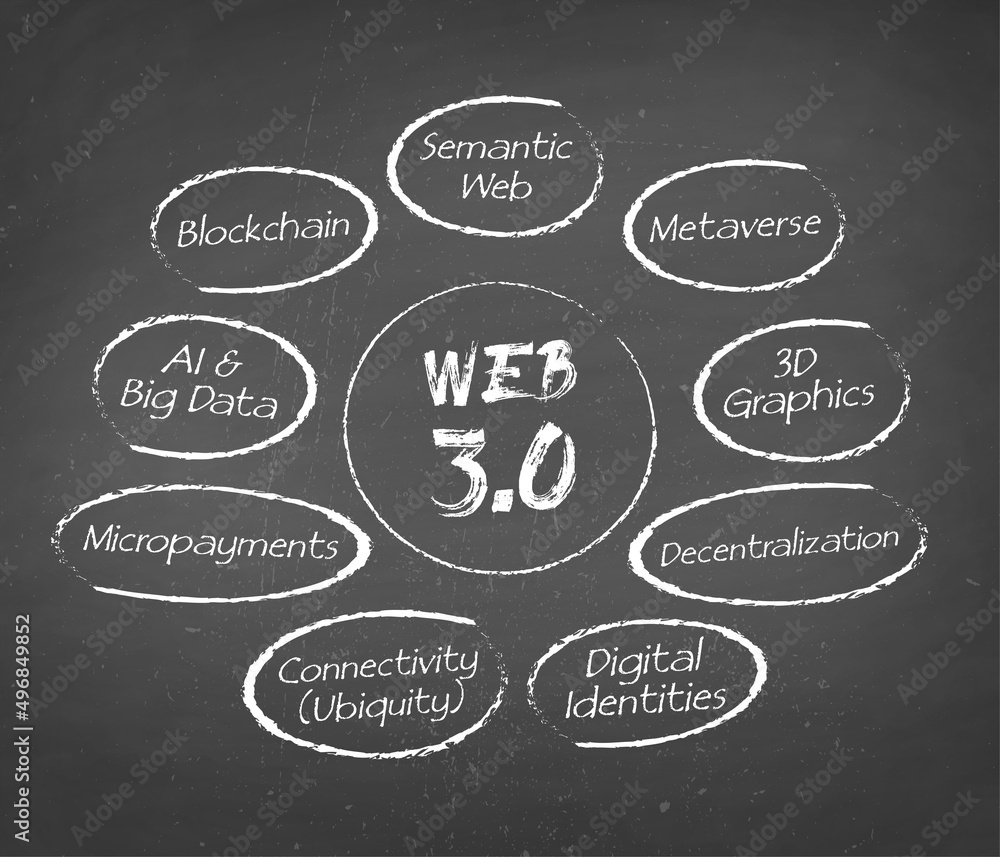
There is a massive evolution in web over a period of time. In the beginning web 1.0 is introduced which allow the users to consume the information only and there were no possibilities for the users to contribute in it. Then web 2.0 allow the users to be interactive through the introduction of blogs, social media and other user generated content which help the learners to work in collaboration through discussions, group projects. Currently we have been shifted to web 3.0 which is also known as intelligent web. The use of technologies such as AI, block chain and machine learning has made this web more predictable, adaptable and personalized and has aligned with Education 3.0 in which the learning concept is student-centered, adaptable and personalized.

                          Web 3.0 structure, module, workflow concept on chalkboard background.

Education system has become more flexible, inclusive and accessible as a result Web 3.0 evolution. As it allow the users to find their own path and involve in it so that they can fulfill their individual needs. It also facilitates educators and learners to collaborate with each other at global level by crossing the institutional boundaries. Web 3.0 is beneficial for the students and the learners who have good access to technology and are good in handling digital tools and internet. Education 3.0 environment provides an opportunity to learners and educators to explore a large amount of information and find their learning path by engaging in the resources that are according to their interest and needs. However, the students and the teachers who are not tech-savvy and have limited access to digital tools are the ones who feel left out in this evolution process. Data privacy and security is another drawback of this Web 3.0 technology which impacts the users. Gerstein’s metaphor focus on the transformation of education system and in this process it is important to ensure that this advancement in technology benefits all the students as well as the teachers.