Understanding Assistive Technologies: Uses and challenges in Education

This week was another great presentation on a different type of technology. Even though I use some of them, I have never thought of them in the way it was discussed in this class. Thanks to Katryna, Ayesha and Kelvin for the wonderful presentation. In the video “History of Assistive Technology-Part 1” by Wendy Torress, the author describes the three periods associated with the development of Assistive Technologies (AT) and explains how various laws and policies have been put in place to support people born with disabilities to be able to integrate into the community using assistive technologies. Assistive technology (AT) encompasses a range of devices, systems, or services designed to help individuals with disabilities perform functions they might otherwise find difficult, thereby promoting independence and societal inclusion. The article by Lamond and Cunnigham (2020) states that any technology that is necessary to aid a student in meeting their individual education plan (IEP) or curriculum goals is an AT. According to Young and MacCormack (2020), these technologies can range from simple tools like pencil grips to advanced software such as screen readers and braille displays, computer programs, and tablet applications that provide text-to-speech (e.g., Kurzweil 3000), speech-to-text (e.g., Dragon Naturally Speaking), word prediction capabilities (e.g., WordQ), and graphic organizers (e.g., Inspiration).

Examples of Assistive tech

Image from https://enablingdevices.com

“Assistive technology helps in two ways: it can help the student learn how to complete the task, and it can help to bypass an area of difficulty. For example, when a student decides to listen to a digital version of a book, they are bypassing an area of difficulty. However, if the student focuses on the computer screen as highlighted words are read aloud, they can learn unfamiliar words” (Young & MacCormack, 2020:p1).

I think a common assistive technology that I have used as a person is audio players and recorders, which are often built into our laptops, smartphones, and tablets. I have used these tools to help me with reading comprehension, as I sometimes prefer to listen to texts while reading an article. I remember back in my undergraduate period that whenever I went to lectures, I usually activated the voice recorder on my phone to take notes and capture lectures, which I later listened to again when doing my personal learning. Looking at the conferencing tools like Zoom and Teams, which I regularly use, these platforms have accessibility features like built-in recording, which I think can be regarded as an assistive technology for students learning online. As we can see in this class, we do have access to recordings of the class even after the discussion is over. And this gives students the opportunity to go back and listen to the discussions again, especially those  with learning differences.

Recording school lecture with voice recording pen

Image by spycentre.com/blogs

My 4-year-old son recently activated a voice-screen reader on our TV by mistake. So, every time he tries navigating various channels on the TV, he keeps hearing this voice reading whatever he pressed on the TV to his hearing. I think the scenario became very annoying for him, and he had to speak out, ‘What is this?” as he started crying. It took me a while to understand what happened, and I had to turn to Google for assistance on how to disable it. Based on the discussion we had had in this class, I realized that the software can be used to help users with disabilities, especially those with visual impairments. They can easily access programs on their TV by listening to whatever information is being displayed on their TV screen.

Speech Therapy Ideas TV

Image from speechtherapytalk.com

Though AT provide flexible learning experiences and support for students, for instance, to support learning and to bypass a challenging task such as handwriting; studies have shown that many teachers lack the necessary knowledge and technical proficiency to integrate AT into their classrooms (Lamond & Cunnigham, 2020). The integration of AT in classrooms might also be limited or hindered due to limited accessibility as a result of funding and a lack of awareness and support among teachers and school administrators (Ansari, 2023).

In today’s remote and hybrid learning environments, creative solutions are essential, and I think schools need to start collaborating with parents and service providers to meet the unique needs of each student. In light of this, Zuger (2020) outlined guidelines that teachers can consider for best practices when trying to use AT in their classrooms, which he tagged SETT for Success Framework:

  • Student—What is the functional area of concern, special needs related to the concern, and the student’s strengths, abilities, and expectations?
  • Environment—Where educators were once looking at the environment of the classroom and school building, they now need to consider the home environment. What are the arrangements and supports available there?
  • Task—What specific thing does the student need to be able to do, and what are the functional things actively involved in remote learning?
  • Toolkit—What can we use to help the student access their curriculum?
My Experience Using Assistive Technology

Assistive technology refers to the devices and services that are used to increase,  maintain, or improve the capabilities of individuals with a disability (Dell, Newton, & Petroff, 2012). A disability is a condition that makes it more difficult for a person to engage in certain activities and interact with the world around them. Some examples of disabilities mentioned by Kateryna in her presentation were; dyscalculia, dyslexia, and dysgraphia. However, the disability that I would like to make personal reference to is; nearsightedness.

https://media.licdn.com/dms/image/v2/C4D12AQFq5S4GFpja4Q/article-cover_image-shrink_720_1280/article-cover_image-shrink_720_1280/0/1637326659648?e=2147483647&v=beta&t=FoVXSND4uW6rYW-Udam_BtjYChRs_JBFYAmt_c8aqVg

Image by Linkedin

Nearsightedness is a vision condition where close-up objects are visible, but, at a distance, they appear blurry. I have had this condition for as long as I can remember but refused to wear glasses as a child because I felt different. I had no knowledge of Assistive Technology, nor was it integrated into any of my classes. This affected my self-esteem, and my performance in school, and gradually my sight got worse. If only I knew then, what I know now. Presently, with the aid of assistive technology I am able to tailor my accessibility settings on all my devices to cater to my visual needs. Inverting colors, magnifiers, text-to-speech and speech-to-text, has been life savers, as they enable to me to use my devices with less strains on my eyes, thus having less migraines.

Limitations and Challenges

Voice control (speech-to-text): this can be really frustrating as your accent, pronunciation, tone and pitch impacts what is written in text.

Lack of competency among teachers: teachers are trained given the basic knowledge of using AT, but, they are not extensively on how to integrate it within the classroom. If the students are not competent in using the tool, it will not be used effectively.

Excessive Use: Users may rely too much on the technology and not try to address their disabilities independently. For example, word prediction has made me so lazy and I can honestly say my spelling skill has certainly decreased.

Costly: Some AT tools are costly and therefore in accessible to some that might need it most. Tools such as braille displays, interactive keyboards, wheelchairs, infrared system and many more.


Posted in Uncategorized

Assistive Technology in the Classroom

The presentation of this week’s group was very eye-opening for me. Although I previously know about assistive technology (AT), they explained it in a thorough manner which made me realize what types of technology I can use more as an educator. For me, the different types of assistive technologies are very powerful in the context of education, wherein these can help the students in their learning journey, and it can also lighten their load as the learn in the classroom.

To define the term, Assistive Technology (AT) is any form of technology that helps students with or without disabilities to increase or maintain his or her level of functioning. Halpin (n.d.) defines AT as a term that refers to devices or systems designed to help individuals with disabilities perform functions they might otherwise find difficult — devices range from mobility aids (Ex. crutches and wheelchairs) to more digital solutions, like screen readers or software. Halpin’s explanation is more of an overall definition, and not just in the realm of education. On an even broader definition, Rice (2024) defines AT as any device, software or item that improves the experience of learning, working or daily life; AT is frequently used by people with disabilities, however, it can be used by all people in various settings.

The short video below is an introductory guide to assistive technology, concentrating on individuals with disabilities. It explains that there are simple (easier to learn) and also high-tech, or more advanced devices for AT. Furthermore, the video also briefly explains not only devices, but services that are integrated with the devices. What they explained in the video is practical and essential, as they mention that the AT services are as important as the devices/gadgets used to aid the students in their learning. I believe that the devices and services should go hand-in-hand in order to guide the students in a better manner.

Rice (2024) mentioned at least twelve examples of assistive technology in the classroom, which are all useful for use in the classroom. In that list, I have used the learning-management platform Google Classroom, during the surge of online classes when the world experienced the most recent pandemic. Since its release in 2014, Google Classroom has quickly become one of the more popular and common online tools utilized in schools. Furthermore, adoption to this technology rose dramatically with the mass switch to online instruction that followed COVID-19-related school closures (Herold, 2020).

I appreciate Google Classroom because of its convenience and also its assistive technology features, like speech-to-text capabilities that improve accessibility for all the students. The live captions in Google Classroom was also very useful in my own experience. In addition, it has built-in accessibility features such as screen readers, voice typing, and translation (it integrates with Google Translate to enable translation). I also had a blind student previously who really appreciated Google Classroom because it featured a braille display for him, which can be used to read and edit Word documents and PowerPoint presentations. After using Google Classroom for a few years, I realized that

Among the numerous AT programs, I believe that I can utilize and explore more on Speechify, which is a text-to-speech software that captures text and translates it into audio format. This is particularly useful for textbooks, PDF reading assignments and more. This software is compatible with the Google Chrome browser as well as mobile phones (iPhones and Android) and Macintosh computers. I personally have not tried Speechify, but this is a software which will most likely be able to aid my future students in learning.

Assistive technology still has quite a long way to go, however, I believe that it will further improve and be more advanced in the future. While it is true that AT is quite costly for individuals and institutions, these types of technologies definitely improve the learning experiences of individuals. For schools, AT ensures that all students, regardless of their abilities, can fully participate in classroom activities —  this means that no one is left behind, whether the student is disabled or not. AT also provides equal opportunities for students who have learning difficulties, making them able to catch up in their studies. Also, overall for society, AT promotes social inclusion — it promotes the active participation of individuals with disabilities in community activities, which is an essential part of social cohesion. In addition, AT enhances the quality of life for individuals with disabilities by providing them with tools and software to navigate daily life more effectively.


Posted in Uncategorized

My Journey of Making Learning Accessible


My journey as an Educator began in India where my experiences shaped from the large classrooms with very limited resources to integrating technology in education to fulfil the diverse needs of the students. As a teacher, every stage in my life comes as a learning lesson. As I reflect on my teaching journey, it reminds me of all the useful strategies I used to make learning accessible for my students. There were plenty of challenges in my teaching journey  like large class size, diverse learning abilities. But with each challenge I get an opportunity to do something unique for my students in order to connect with them in meaningful ways. 

I have used multiple tools from time to time to make learning accessible for my students and it really transformed what I teach and learn by breaking down all the barriers like students with disabilities, connecting learners across the globe, or providing flexible ways to engage with content. Tools like zoom or google classroom were really helpful for my students to learn virtually during pandemic. Additionally, as I was moving forward in my career I understood how important differentiated instruction learning is. Not all students learn the same way so I adapted colourful charts and diagrams for visual learners and integrated tools like YouTube to show them videos of the concept to grasp easily. This approach not only made learning more relatable but also helped my students to understand the concepts easily. Also, by inculcating tools like Quizzes or Kahoot fun in the classroom, the excitement is unmatched. 

Today’s presentation by Kateryna, Aysha and Kevin has given me valuable insights about useful assistive technologies we can integrate in our teaching practice. I have learned about how these tools would  support students with disabilities and  also modify the learning experience for all by creating a more supportive and inclusive environment. I am excited to explore all these technologies further to make learning more accessible, engaging, and equitable for everyone.

What were your challenges in your teaching journey before and after technology? 

Let’s share and learn from each other !


Role of Assistive Technology in Education- an Overview

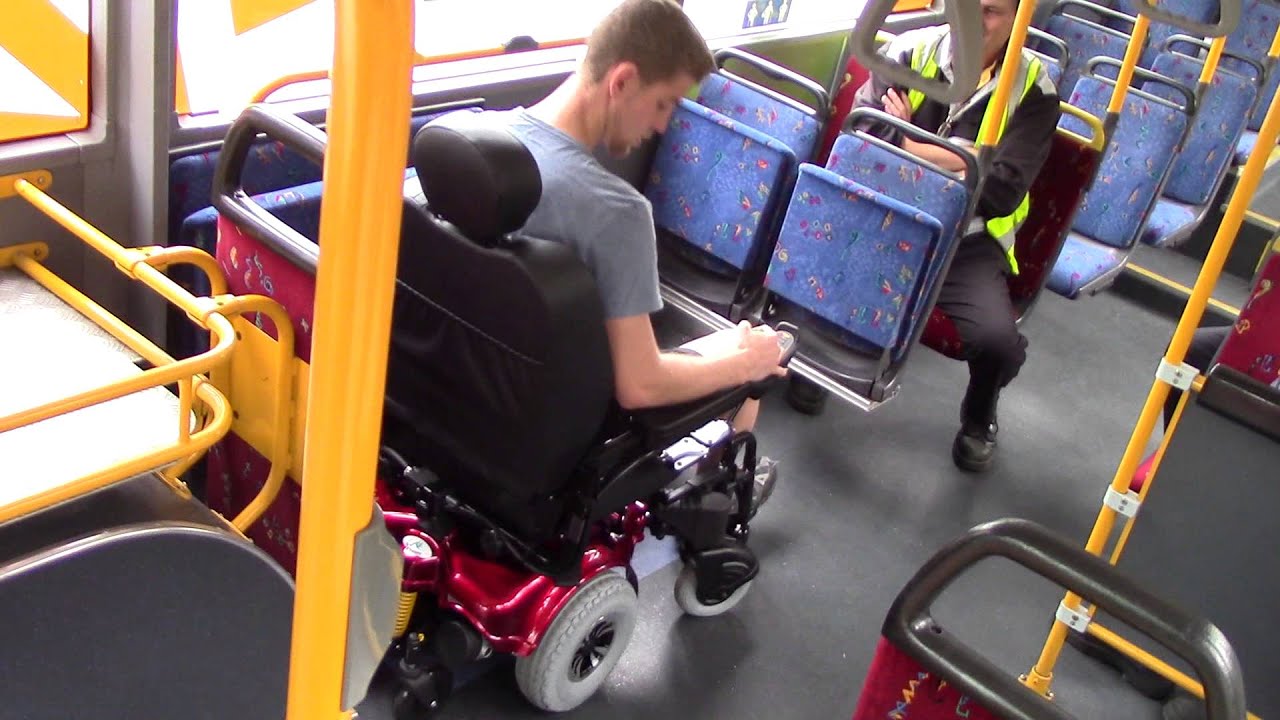
I can undoubtedly claim that Assistive technology has transformed the teaching methodology of educators like me, thus making learning more accessible, engaging and inclusive for all students. Like many educators around the globe, I too have experienced the unimaginable potential of AT during the pandemic. Not just educators, the society is benefiting immensely from AT. The daily scenes of deferentially abled individuals in public places using AT’s like self-operated electric wheel chairs with ease and comfort is indeed heartwarming.  Despite all these benefits of AT, there are some challenges and limitations that need to be addressed.

All of us are aware of platforms like Zoom and Google Meet that became invaluable tools for online classes. These platforms don’t limit participation being online, in turn, it enables real-time interaction, allows to share presentations and organize structured online sessions. When I tried to integrate Google Suite into my teaching methodology, I found that it streamlined the whole process. Students could build on their digital literacy skills by creating PowerPoint presentations or using Word and PDF s to organize their work.

I have found that using visual aids like smart-boards and overhead projectors with interactive features not only capture student’s attention but also makes lessons more dynamic and engaging. I often encourage students to watch You Tube videos on specific topics as visual explanations are better retained enhancing understanding and engagement. Educators can provide creative worksheets and exercises that align with academic topics to students through online educational platforms, ensuring effective learning experiences.

The video on The History of Assistive Technology shows the evolution of AT from need based individual inventions like Braille to law and rights-based interventions that prioritize accessibility and inclusion in the society. The history of AT reminds us its importance in every era and the significance of integrating it into our societies. AT’s role in making learning inclusive for students with diverse needs in reinforced in the article “What are the Key Benefits of Assistive Technology?”. It also unveils how AT tools foster independence and personalized learning experiences when used effectively.

The challenges when it comes to effective integration of AT is often varied perceptions, limited training and technical proficiency among educators. This can be seen well explained in the article “Understanding Teacher Perceptions of Assistive Technology”. On a personal level, while AT has greatly influenced my teaching practice, I must admit that the challenges remain. The high cost of these can be a vital drawback. Additionally, students and teachers using AT require consistent training and support. Overall as educators we must adopt the Universal Design of Learning methodology that highly supports the use of AT to enhance education for everyone.


Posted in Uncategorized

My Personal experience of using Assistive Technology

hand holding wireless peripheral, modern technology concept

hand-holding-wireless-peripheral-modern-technology-concept-stockpack-adobe-stock

Here, I would like to take privilege to pay gratitude to today’s presenters for a well descriptive talk on Assistive Technologies, which is use of any device, equipment or product system to assist or enhance functional capabilities of learners with special needs or disability. It develops equity among diverse learners in education system. It has developed over the years and eased not only people with disability but also people the normal civilians. It is prevalent nowadays in general, professional and academic sectors with variety of its applications. I have been using some of these assistive technological product systems unknowingly that its piece of any assistive technology. In this blog, I will share my experience with those technological products along with its uses, challenges and drawbacks.

icon tram black outline for web site design and mobile dark mode apps Vector illustration on a white background

icon-tram-black-outline-for-web-site-design-and-mobile-dark-mode-apps-vector-illustration-on-a-white-background-stockpack-adobe-stock

  • Dark mode features of mobile phone are the assistance I have been using from last couple of years without knowing the fact that it a kind of assistive technology that help people with visual impairment such as colour blindness. It is the feature common in mobile phones and tablets, which uses light coloured texts or icons against dark background. Night mode on mobile phones also performs the similar function for some people with visual disability. I personally prefers this because of its soothing effect on my eyes while using my mobile phone or tablet for doing my academic work, as a result I could be on screen for more than usual time. It turns out to be more productive academically. However, this feature can be discomfort while using in brightly lit conditions. Sometimes, it may also cause depressing and mourning impact on the readers.
alphabet letters with caption words. the concept of sentence usage or the structure of something. a title or brief explanation accompanying an illustration, cartoon, or poster.

alphabet-letters-with-caption-words-the-concept-of-sentence-usage-or-the-structure-of-something-a-title-or-brief-explanation-accompanying-an-illustration-cartoon-or-poster-stockpack-adobe-stock

  • Closed captions or subtitles: I have witnessed multiple times while watching any informative YouTube video along with subtitles or captions on the screen, to assist learners or people who are deaf or hard of hearing or people who are non-native. People who can not hear, can consider it as blessing technology. I have experienced that YouTube app has got a feature which need to be enabled to turn on captions or subtitles and help people with disability to understand the content of the videos. This technology is applicable for video content only. Unfortunately, not all videos may have subtitles. Secondly, someone need to be quick at reading captions.
Using smartphone for voice command, man working on laptop in office

using-smartphone-for-voice-command-man-working-on-laptop-in-office-stockpack-adobe-stock

  • Speech to text software: Google Dictation in practiced by me often to help me in writing large texts easily. It converts spoken words into text. Basically, it is a piece of technology designed to assist people with motor impairments, learning or writing disabilities. Accent of speaker, background noises or rapid or quick speech can be drawback that may lead the software to cause error. As a consequence, errors can be made while typing the text.
  • Text to speech software: While exploring features on my laptop, I came across this feature, that reads the text aloud and can ease the life on a common civilian and the people with learning disabilities like, Dyslexia or ADHD. It eases the life of learner by not putting much emphasize on our eyes. But it can be heard to use sometimes as the voice quality, using AI tools, can be distracting of hard to understand. It may also cause confusion among learners because of pronunciation errors.
A seasoned financial advisor presenting a comprehensive webinar on stock trading basics, aimed at new investors, with a professional virtual backdrop and visual aids.

a-seasoned-financial-advisor-presenting-a-comprehensive-webinar-on-stock-trading-basics-aimed-at-new-investors-with-a-professional-virtual-backdrop-and-visual-aids-stockpack-adobe-stock

  • Visual Aids: It is a kind of assistive tool that can help people with visual impairment or blindness. I have read a lot about Braille system, which was developed to help people who could not see. It was most popularly and widely accepted technique to help people with disability. It was the part of foundation period assistive technology. They could read without their eyes, using their tactile ability of their hands. It has a downside as prior learning of braille system is required to read the text. Another important tool was screen reader, that could read the screen text aloud for learners with visual disability.
  • Hearing Aids: This technology if used by people with hearing impairments, that helps people to converse or engage with others effectively. These tools magnify the noises or sound for disabled people. These tools help people to hear or gather information from the surrounding and help in their interaction with their fellows.
  • Mobility Aids: Which help people with physical disability, such as wheelchair. People with disability use those items to commute from one place to another. it induces better mobility among people with physical impairment. It can be disadvantaged as lack of service facilities can be barrier on its way.

High cost of these tools or products can be a major issue among its users as it needs a large amount of money to get or maintain these products. Educational assistive tools can not be available at all the learning institutes. Lastly, Educators are not necessarily Assistive technology competent always. These are some general limitations to use Assistive technology for people with special needs.

In the summary, I would like to say that these Assistive technological tools are a kind of blessing for people with any kind of disability that eases the life of them and leads to equity among diverse learners, especially with disabilities. Although, it has certain drawbacks such as cost effectiveness, availability and lack of AT competency among educators.

For this blog, I have been through article What are the Key Benefits of Assistive Technology?

I have also read https://casls-regina.primo.exlibrisgroup.com/permalink/01CASLS_REGINA/1b4umnc/cdi_proquest_journals_2401680619

I have also watched a YouTube video https://youtu.be/omjVM1lwkII?si=7HGtHCCXSEn5aLFo


Posted in Uncategorized

Digital and Online Assessment in Education

Assessment in education ideally should be as objective as possible, in order to be fair in grading the students. In recent years, aside from the traditional tools like using rubrics in assessing activities and school projects, there have been numerous assessment tools for teachers to use. Digital assessment, or online assessment has now been regularly used by schools in order to be more reliable and accurate in assessing students’ learning.

Nowadays, in the few years after the COVID-19 pandemic, many schools and universities still have online or hybrid classes from time to time. Schools and students have seen its convenience, especially during bad weather. Not only classes are online sometimes in the present time, but also assessment tools are more online or digital in the present era. According to Olurinola (n.d.) in a UNESCO article, assessment is a critical component of the educational system because it provides feedback to learners and teachers on learning progress and achievement. In recent years, digital technologies and various software have drastically revolutionized the assessment process, offering innovative ways to measure the students’ progress. Compared to the traditional model of assessment, which was mostly paper-based, the integration of technology in assessment has become more convenient and sometimes with less bias toward the learners. Teachers can leverage technological assessment in order to develop more reliable and efficient assessments that can help them further understand the students’ learning.

Mobile devices with touchscreen interface

The e-Assessment Association explains the opportunities and challenges of online assessments as follows. For the opportunities, online assessments offer 1.) flexibility and convenience as test-takers have the freedom to schedule and complete assessments according to their preferences, 2.) Immediate feedback — online assessments often offer automated grading and immediate feedback, enabling test-takers to receive prompt results, and 3.) Scalability — online assessments can be administered to large groups of students at once, which can save time and resources. This can be especially beneficial for schools, universities, and classes with large student populations.

For the challenges associated with using online assessments, the e-Assessment Association discussed that 1.) Technical issues can hinder the conduct of online assessments. Issues such as internet connectivity (or lack of stable internet connectivity) and software compatibility can disrupt the assessment process. 2.) Digital literacy — Students and sometimes even teachers who lack proper digital literacy may struggle with navigating the functionalities of online assessment platforms. They may find it challenging to locate assessments, submit responses, or access feedback. This can cause equity among the users of online assessment software.

Routh (2024) added that one other challenge that can be attributed to digital or online assessments is data privacy — a very big word in this present era. Online assessments can also pose privacy challenges. An online assessment platform normally contains personal information about students, such as names, contact information, and test results. This information can be targeted by online hackers, thus compromising student privacy and safety.

Glowing light bulb and book or text book with futuristic icon. Self learning or education knowledge and business studying concept. Idea of learning online class or e-learning at home.

In my opinion, digital assessment is the way to move forward. It is more convenient for the stakeholders, especially for the teachers, because they can further understand in a more prompt manner the students’ comprehension. However, as discussed in the preceding paragraphs, the challenges can sometimes outweigh its benefits. Thus, schools must be aware of these challenges. Furthermore, governments must craft policies in order to ensure the proper use of online assessments in schools and universities. This way, the proper implementation of digital assessments can be more beneficial for the students and teachers.

Posted in Uncategorized

Enhancing Student Outcomes Through Project-Based Learning and Educational Technology

Picture created by Microsoft Copilot in Bing

The Saskatchewan Teachers’ Federation pointed out in a news release from February 7th, 2024, that 2023-24 Teacher staffing levels increased by 10 positions as compared to 2016-17 school year.  This indicates a .1% increase in staffing.  During that same period Saskatchewan’s student population has increased by 15,875 students an increase of 8.8%.  A decrease of professionals such as counsellors, psychologists and speech and language pathologists has also declined more dramatically in one year from the 2022-23 to the 2023-24 school year counsellors have seen a 7.7% reduction and other specialists have declined 15.5%.  What this means is that more issues pertaining to complexity and size is hitting our Saskatchewan classrooms more than ever.

To address the student needs it is going to take a multi-faceted approach.  In this blog I would suggest that one such path would be to implement more Project Based Learning (PBL) and Ed Technology into our classrooms to effectively address the challenges of large class sizes and diverse student needs.  This is done by creating an environment that is engaging, personalized and it’s philosophical foundation is built on collaboration to prepare students for the 21st century.

The Buck Institute for Education would describe PBL as “A teaching method in which students gain knowledge and skills by working for an extended period of time to investigate and responds to an authentic, engaging, and complex question, problem or challenge and make their work public.”  In essence PBL promotes “active learning” and relies heavily on inquiry-based learning.  John Dewey considered the grandfather of PBL, firmly believed that the teacher is essential in guiding the student’s learning by creating authentic “need to know” for students.  You want students to grow intellectually, emotionally, and spiritually.  The goal is certainly not for students’ lone aspiration is to get a good grade on the test.

The research paper titled, Project-Based Learning Increases Science Achievement in Elementary School and Advances Social and Emotional Learning (Krajcik et al., 2021) found that Social-emotional Learning (SEL), had “significant and positive effects” because of students working together in a collaborative learning environment.  The student indicated that students reported that had an increased appreciation for reflection and collaboration.   This is significant for these highlights sharing of insights and experiences with others is a staple for student growth.

The article “Using Edtech in Service of Human Connections” is a great article.

https://www.edutopia.org/article/how-reduce-edtech-use-schools

This article has pointed out that Ed Technology has skyrocketed since 2018 to present.  In France the use of Ed Technology has more then tripled in that time frame.  Even in my school division I have seen a similar trend regarding use of Ed Technology.  What I like about this article is that it makes the teacher as on simple question.  “Does the tech preserve or enhance human connection in the classroom?  If the technology does not promote interpersonal connection, then what is the purpose?

This is where PBL can support Ed Technology integration into the classroom.   Ed Technology can have an isolating impact on student learning.  This will adversely impact a student’s learning for the are not being exposed to other people’s life experiences.  Conversely, PBL will thrive with the use of Ed Technology for it has the potential to increase collaboration beyond just physical limitations.  It also can showcase each students skill set to their peers.   Truly, together students can achieve magnificent things in their educational journey and within themselves.

One note that the technology integrated in a PBL Model also opens the opportunity to integrate Assistive Technology in the classroom.  Thus all students are able to contribute and share their knowledge and life experience with others.

Posted in Uncategorized

Assessment Tech

I was happy Nysa showed off Google Forms as that is one software that is free and integrated with the rest of the platform that many schools are using. As a Google Based school utilizing Google Classroom and other Google products, the use of Forms is one which works nicely, doesn’t require expensive subscriptions, allows the screen to be locked and collects students information safely. In a world where cyber attacks are all too common, the use of some of the third party apps and programs is a concern for myself and the IT department. 

The online platforms that were shown during the presentation and discussed in the articles did provide a lot of great advantages to using the software. The ability to track results over the long term, protect your exams from being copied, mix up the order in which students see questions to prevent cheating, and grade many questions automatically are all beneficial. For most of these technologies the paid version offers a lot more options which could really expand and provide more options like keyword tracking and more advanced correcting in mathematics. 

One area I’ve struggled with lately is students using AI programs like Chat GPT to complete assignments. Unfortunately, the AI detectors do not seem reliable enough for a teacher to accurately make a decision if a student’s writing was cheating or not. This is where professional opinion still trumps some of the technology that exists. A program like Go Guardian allows teachers to monitor students’ chromebooks and be able to see students working on their assignment. Google Docs also allows a teacher to see the history of a student’s progress to see if large amounts were copy and pasted. Of course, a student could have two tabs open and type out the Chat GPT work as well. Each program that is introduced creates some challenges and provides some opportunities. Each should be used for its opportunities for monitors for the challenges. Setting clear expectations with students, monitoring their progress, and having conversations with them about their findings and finished work help to eliminate the challenges. 

Posted in Uncategorized

Assessment as a Conversation: Balancing Technology and Good Practices


( https://images.app.goo.gl/4fEXXfjJKy6KfmcL9)

Joe Bower’s statement that “Assessment is not a spreadsheet, it’s a discussion” highlights an important reality concerning assessment in education. Assessment ought to be a dynamic process that promotes the growth and learning of students. But in practice, assessments are frequently reduced to objective numbers and scores, creating a stark contrast. This problem has been made more complex by the widespread use of assessment technology, which occasionally gives preference to readily measurable measures over more thorough and insightful analyses. It is vital to ensure that new technologies enhance sound evaluation procedures rather than compromise them as they become more integrated into classrooms. This blog examines how we might use evaluation tools to encourage advanced student thinking and learning while.

Technology’s place in assessment multiple-choice exams and scantron systems are examples of assessment technologies that have long been praised for their effectiveness and impartiality. These methods, however, frequently fail to capture the complex comprehension and critical thinking abilities that actual learning requires. Technologies that place a high priority on these evaluation methods may unintentionally promote a cursory approach to education in which pupils value rote memory over in-depth understanding.

video conference, zoom, meeting
Photo by Alexandra_Koch on Pixabay

Promoting Good Assessment Practices

To guarantee that assessment technologies promote good practices, instructors must include tools that permit more extensive evaluations of student learning. Here are a few tactics to think about:
1. Formative Evaluations: Technology-enabled formative evaluations can offer continuous feedback encouraging students to consider their learning. Learning management systems (LMS), interactive tests, and digital portfolios are some tools that can monitor student progress and provide information that informs future instruction.

2. Diverse Assessment Techniques: Technologies ought to facilitate a range of assessment techniques, such as open-ended questions, peer evaluations, and project-based learning. These techniques support the development of higher-order thinking abilities in students by encouraging them to apply their knowledge in practical settings.

3. Personalized Learning: By customizing tests to meet the needs of each student, adaptive learning systems can offer more areas where students struggle and offer targeted interventions to support their growth.


Business people, meeting and paper with charts for sales planning, portfolio and company report. Top view, digital marketing and team with tech in discussion for brainstorming, idea or plan of growth

(Photo by Samir H/peopleimages.com on Adobe Stockistock)

Addressing Cultural and Social Effects

Examining the Impact of Culture and Society: Cultural and social ramifications may arise from the usage of evaluation technology, especially about accessibility and equity. Addressing these possible problems is crucial to establishing an equitable and welcoming learning environment.
Equity in Access: Make certain that every student has the tools and technology they need to fully engage in tests. This entails giving students from various backgrounds gadgets, internet access, and technological assistance.

Bias and Fairness: Try to reduce the influence of any potential biases in evaluation instruments. This entails choosing resources that are sensitive to cultural differences and creating tests that take into account a range of viewpoints and experiences.

Student Voice: Include student opinions in the evaluation procedure. Discussion boards and online surveys are examples of technologies that can provide platforms for students to share their thoughts and feedback, fostering a more dialogic approach to assessment.

Connection with Student’s presentations and readings

The student’s presentation emphasized several cutting-edge evaluation techniques that support these ideas. For instance, using digital storytelling as a method for evaluation enables students to creatively convey their learning, encouraging participation and critical thinking. The group’s assigned readings also underlined the value of individualized learning and formative assessments, highlighting the necessity of technology that facilitates these strategies.

Assessment technologies have the potential to revolutionize the way we evaluate student learning, but their use must be guided by principles of good assessment practice. By prioritizing formative assessments, diverse methods, and personalized learning, educators can harness these tools to support high levels of student learning and thinking. Moreover, addressing the cultural and social effects of these technologies is essential to ensure equity and fairness in the assessment process. Ultimately, by fostering a conversational approach to assessment, we can create a more meaningful and impactful learning experience for all students.