
DIGITAL ERA OF CODING

Software computer programming code

software-computer-programming-code-stockpack-adobe-stock.jpg

Coding or Computer programming is, a key concept in computer science, the languages used to give command or instructions to the computer. For instance, Java, C ++, SQL etc. In this technological era, it is cosmopolitan concept which is used in every commercial sector. People, after gaining proficiency on IT skills, pursue it as career or profession to earn their bread and butter. It is one of the highest paid professions these days. Experts in coding can adapt professions like Software developers, Engineers, Website designers etc. Nowadays, teaching of coding has been prevalent for students at educational institutes to fit in this digital era.

Tiny office workers sitting on huge hand. Concept of good comfortable environment at work, favorable psychological climate,high pay and freedom of creativity for employees. Raster flat illustration

tiny-office-workers-sitting-on-huge-hand-concept-of-good-comfortable-environment-at-work-favorable-psychological-climatehigh-pay-and-freedom-of-creativity-for-employees-raster-flat-illustration-stockpack-adobe-stock.jpg

I believe, if students learn Coding skills, they will be gaining expertise in this and get into certain professions successfully, such as Engineering and software designing. Thus, they can be successful professionals. They can be at higher positions in multinational companies and other related industries. Secondly, they can also start up their own business and get into entrepreneurship by designing websites, apps and games. Additionally, there is a fact that proficient coders construct logical thinking and problem-solving skills. Moreover, it also makes students creative and enhances creativity in them.

As per opinion, coding is used in every sector and if learnt by everyone, may draw benefit out of it. Programming is a concept, that is quite difficult to understand until it is practiced. Hence, it demands a large amount of practice. It benefits those learners who are IT literate and practiced a lot on coding. To do well in coding, one must have professional degree in it. However, students, who are not from IT background, can not gain proficiency in it and can not practice on it. Consequently, they will lack in computational skills and can not do well in it. Another downside of this is, it needs computer devices and internet connection, so one’s lacking these resources can not learn these programming skills.

If I talk about my personal experience with coding, unfortunately, I find it pretty much hard to learn. In terms of computer knowledge, I find myself at beginner’s level or basic programmer. Initially, I am from medical background and had not to learn coding ever and could not practiced much. I perceive, Coding or programming is not my cup of tea. But, to cope up with my recent curriculum, I have started looking into coding tutorials, so that I could also inculcate these skills into my students.

I have always been Science teacher and engaged myself, throughout my professional journey, with science teaching only. I have started learning coding skills from coding tutorials as learning computer languages is need of hour.

I agree with the notion that coding can be taught by experts who have certification for that because it a technical field which requires practice and certification too. Tech savvy person gains expertise in programming pedagogy and will be able to teach it to students. It is hard to teach these skills to undergraduate students until you have proficiency in computational skills which is only possible by practicing on it.

For this blog, I have been through, Teaching-programming-in-schools-pedagogy-review-Raspberry-Pi-Foundation.pdf

I have also read, An Overview of STEM, Robotics, Coding, and Maker Spaces


Posted in Uncategorized

Making Education Accessible: Strategies for Inclusive Teaching

One of my main responsibilities as a teacher is to ensure that all students in my classes get the best learning environment possible. Therefore, usability in the context of learners with disabilities is not a matter of passing legal requirements with flying colors; it is a matter of making sure all learners can interact with the material and the classroom as effectively as they possibly can. In this blog post, I will present some of the technologies and techniques I employed or could employ in order to improve accessibility in face-to-face, flexible/blended, and online environments.

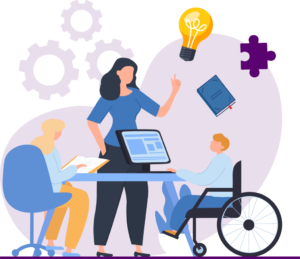
Furthermore, I define equality as simply giving all the students an equal chance of accessing educational materials and facilities. This reaches the disabled, the learning disabled, or anyone with other complications that may affect their studying. It is therefore important that we recognise inclusive technology to increase the chance of breaking barriers and enriching the learning experience for all.

Leveraging assistive technologies:

Basically, the most effective interventions are addressed through what is known as assistive technologies (AT). These tools have been developed to support educationally marginalized students to better interact with course material, such as visual aids, hearing aids, mobility ads, etc. Some of the examples are:

Speech Recognition Software

The functionalities of this innovation include voice-enabled computation through the use of voice and voice commands for facilitating control and interaction with computers and other related devices. It transcribes spoken words; for instance, those who have writing challenges  will not struggle to write or express themselves. We are now able to voice type and voice navigate with officially supported products such as Dragon NaturallySpeaking.

Closed Captioning and Transcripts

The feature of closed captioning offers a written text version of spoken words in the videos for benefiting the students with hearing impairments. The description also comes in handy when used in audio and video materials to enable the students to have something to read as they listen, especially those students who have issues with processing auditory information. The combined use of cooperation and competition makes information easy to understand and easier to remember.

Audiobooks:

Audiobooks refer to recorded books you can listen to and capture the essence of the written word in the comfort of your preferable place. Gettable from sites like Audible or through the Libby app, audiobooks can be played through, or on, smart phones, tablets, and a laptop, which makes them adaptable to multitasking during car rides, exercise, and cleaning. They have enormous utility, especially to visually impaired or those with reading disorders since they act as a way of presenting content not possible using text alone. There are many genres and titles in Audiobooks, many of these consist of professional readers for the audiobooks to make the books more interesting with how they read the books.

Applying Universal Design for Learning (UDL)

Universal Design for Learning is a concept that I love to use in the class as it provides a structure way to meet the diverse need of all students, so first of all, I prefer multiple representations since there are several ways one can engage with content, and I offer a variety of options that are useful for class activities, group discussion, and project work that corresponds to learners’ preferred mode of processing information. Further, I would like to incorporate multiple means of representation to provide content in one medium, another medium, and a third medium by creating videos, infographics, and demonstrations to accommodate each of the students. Finally, I promote multiple ways of doing things and showing knowledge which enables students to use resources in ways that they enjoy and believe to be most effective including through presentation, projects, writing and so on.

Exploring Emerging Technologies

New technologies are quite key in influencing the educational sector through granting new means of teaching and learning processes. AI is currently in vanguard, which through its ability to create customized learning pathways by incorporating content that addresses a student’s specific needs and through its capacity to deliver grades and feedback for students. Virtual Reality (VR) and Augmented Reality (AR) components allow students to learn at a higher level and create a realistic experience that lets them travel around the world or a particular place virtually, or perform some exercises that will enable them to learn more effectively than just following theories or listening to instructions only.

In the same way, the use of games in the teaching and learning process, absorbs interest and active participation by using the features of a game that include challenge, reward, and competition. At the same time, the technology will develop and become integrated into every aspect of teaching and learning creating a more effective and efficient environment.

This poses the question is there a way that we as educators can make our classrooms favorable for students to learn in regardless of their problems or not? Using assistive technologies and applying Universal Design for Learning, discovering promising technologies, constructing supportive infrastructures, continuous training, and involving families, we can build the educational setting for all students with differences.

I have read these resources for this blog-

What are the Key Benefits of Assistive Technology?

https://www.cast.org/impact/universal-design-for-learning-udl

Utilizing Technologies to Improve Accessibility in the Classroom

Posted in Uncategorized

My Assistive Technology Experience

As someone who has only been in education for 7 plus years, and in small rural schools for the most part, I have had limited experience with assistive technology. The main exception to this came in my second year of teaching. I had taken a position in a small K-12 school teaching high school classes, and in grade 12 there was a student who needed the use of a wheelchair. This student was academically above average, but physically, needed the assistance of technology to help in the day to day life around the school.

The school had been equipped with a fully adapted washroom with everything needed to allow the student to use it independently. Ramps had been installed for easy access to the school and for up a step inside as well. The student had 2 modified lockers with lowered shelves for school supplies and belongings. They also had a couple of extended tools for reaching items that fell on the floor or could not be reached, say in the library. These are mostly technologies from the Establishment period, as we saw in the video from this week, The history of Assistive Technology Part 1.

As far as digital assistive technology, the only one I recall this student using was Speak to Text. This was not used often, but under extenuating circumstances.

As that school year came to a close, graduation brought up a new challenge; climbing the stairs to get on stage. We rented an electric portable lift, designed for this, and decorated it to match the ceremony colors. This technology would be from the Empowerment period.

Assistive technology takes many forms and serves so many vital purposes in our goals of inclusion. They are constantly evolving and growing to help our students have access to everything they deserve.

Posted in Uncategorized

Digital Assessment Practices: Where are we at?

This past week my group looked at assessment technologies that are becoming more and more prevalent in education. This was also an interesting way to look and reflect on my own assessment practices. Are we just crunching numbers and looking at data on a spreadsheet or are we actually using what we collect in a meaningful way; to help find ways to teach students?

As an administrator, I have to assess data all of the time to ensure my students are getting the best education possible, but there are times where the data does not tell the whole story and I believe this is the same with teachers and students. There is only so much that digital assessment can tell us. We still need to talk with students to see if there understandings go deeper than what is on the page or screen. Some students struggle to use technology but can orally express their knowledge successfully. Classroom settings can cause anxiety as well, so accommodating some students with one on one or quiet areas to work can foster learning for some.

My point is that tools like Kahoot and Socrative are just that; wonderful tools to assist in the assessment of students. They are merely one aspect of assessment, or one tool in the toolbox. Some teachers may become too reliant on this one tool and that is maybe the case for many of the different tools in this regard.

Being balanced in your practices is something that any teacher has ran into. The key is recognizing this and always evolving in this respect.

Assistive technology: Experience, Challenges, and Limitations


(https://images.app.goo.gl/uWuw1U6uwk4kZ2J37)

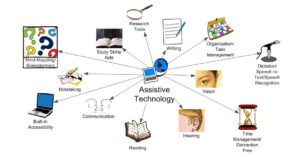
Assistive technology refers to devices or systems that assist individuals with disabilities in performing tasks that may otherwise be difficult. People often connect assistive technology exclusively with individuals with disabilities; however, assistive technology can be beneficial for anyone who requires support. Common examples of assistive technology that we use daily include Google Assistant, Amazon’s voice-activated Alexa, and Siri. Other examples include text-to-speech software and word prediction tools. It encompasses both low-tech tools, such as pencil grips and the Jouse3, as well as high-tech solutions like proofreading software such as Ginger, which helps students with dyslexia and other learning disorders improve their writing skills. Additionally, MathTalk is a speech recognition software that assists students with disabilities, covering subjects from pre-algebra to PhD-level mathematics. In educational settings, assistive technology may involve calculators, electronic worksheets, and spelling software like Phonetic, among other tools. From screen readers and speech-to-text software to adaptive keyboards and mobility aids, AT has the potential to transform lives.

My experience with assistive technology:

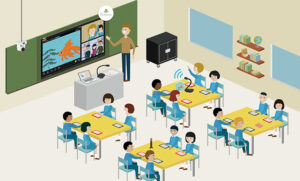
As a language teacher, integrating assistive technology (AT) into my classroom has been both a rewarding and challenging journey. The use of AT has opened up new avenues for teaching and learning, making language education more inclusive and effective for students with diverse needs. I remember using the smart-class boards in class and in the assessment of speaking and listening (ASL), I always take the help of these technologies. I believe these devices of technology can prove as an assistance for an educator.

(https://images.app.goo.gl/sX7PKkk4yaDAPgEg6)

Assistive technology tools like screen readers, speech-to-text software, and translation apps have made language learning more accessible for students with visual impairments, hearing loss, and other disabilities. For instance, screen readers have enabled visually impaired students to read and navigate digital texts, while speech-to-text software has helped students with dyslexia or physical disabilities to participate in writing activities.  Assistive technology allows for greater personalization of the learning experience. Tools like text-to-speech software can adjust the speed and voice, helping students process information at their own pace. Language learning apps and software often include customizable features that cater to individual learning styles and needs. Interactive AT tools, such as language learning apps, multimedia resources, and virtual reality (VR) environments, have made lessons more engaging. These tools provide immersive experiences that enhance vocabulary acquisition, pronunciation, and comprehension skills. Assistive technology accommodates various learning styles by providing multiple ways to access and engage with content. For example, visual learners benefit from video and graphic aids, while auditory learners gain from audio recordings and speech-based activities.

Challenges:

  1. Implementing Assistive technology in the classroom often involves technical difficulties. Devices and software can malfunction, leading to disruptions in lessons. Compatibility issues between different AT tools and educational platforms can also pose significant challenges.
  2. Both teachers and students require adequate training to effectively use Assistive technology. Initially, I faced a steep learning curve in understanding and integrating these tools into my teaching practices. Ongoing technical support is also essential but not always readily available.
  3. High costs associated with purchasing and maintaining Assistive technology can be a barrier. Many schools and educators face budget limitations, making it difficult to acquire the latest and most effective Assistive technology tools.
  4. Integrating Assistive technology into lesson plans requires additional time for preparation and adaptation. Customizing materials and activities to ensure they are compatible with Assistive technology can be time-consuming.

Limitations:

  1. While Assistive technology tools offer some level of customization, they may not fully meet the specific needs of every student. Finding or adapting tools to fit unique learning requirements can be challenging.
  2. Over-reliance on Assistive technology can sometimes hinder the development of foundational skills. For example, students might become dependent on translation apps rather than developing their language translation abilities.
  3. Some students may feel self-conscious about using Assistive technology, fearing it may single them out. Additionally, there can be resistance from both students and educators to adopting new technologies due to unfamiliarity or skepticism about their effectiveness.

According to me, one of the main limitations is high costs. The purchase price of assistive technology (AT) devices can be very high, making it challenging for individuals or institutions with limited budgets to afford them. Ongoing expenses for maintenance, repairs, and software updates can further increase the financial burden. Public and private funding sources may not always cover the full cost of assistive technology, leaving users responsible for any remaining expenses. Furthermore, Schools, workplaces, and other institutions may not have the necessary infrastructure or policies in place to support the effective use of Assistive technology. Inadequate policies and regulations can hinder the adoption and implementation of Assistive technology. With the appropriate support, the use of assistive technology can be productive for the needy. In my opinion, the professional development of educators in using the devices of assistive technology can bring positive changes and will make the teaching-learning process more effective.

In conclusion, while the integration of assistive technology in language teaching comes with its set of challenges and limitations, the benefits it offers in making education more accessible and personalized are undeniable. By embracing these tools and continuously seeking ways to improve their implementation, we can create a more inclusive and effective learning environment for all students.

Assistive Tech – Helping us Help Ourselves


        Assistive Technology has played an ever increasing role in my classroom over the course of my teaching career. As every individual has such unique challenges in learning about, interpreting, and interacting with the world around them, there are countless reasons for assistive technologies in our world. I appreciated the attention that the presenters brought to the history of assistive technologies, referring to examples such as braille, reading glasses, artificial limbs, and wheel chairs. This focus really shed light on how assistive technologies have been meeting needs and improving the quality of life for people for a very long time. For the purpose of this blog post, I will be referring to digital technologies used in the classroom to enhance student learning. 

    As the foundational philosophies backing assistive technologies are heavily rooted in social justice and human rights, there is no wonder why the resulting impacts have been so positive in our classrooms and society in general. I guess the most remarkable thing about assistive tech is it's ability to empower individuals with disabilities to have equal access and opportunities in life. As mentioned in the presentation, this idea is at the forefront of the Rehabilitation Act (1973 - present). I would say that as technologies have advanced, the usage has become less obvious for the user and as a result draws less attention to them in many cases. One example would be reading glasses; I think about in my youth how there were only a couple of styles of glasses (mostly not very fashionable and definitely not 'cool') and now kids have so many options for glasses and even contact lenses. This is just one example of the empowerment born of a technology that has become developed and accepted by mainstream culture.


    I have witnessed the positive impacts of assistive technologies in the classroom over the years. Students who have assistive technology built into their learning program are often able to independently find successes with day to day tasks and gain confidence in themselves as learners. Additionally, learning becomes so much more individualized and it is less obvious that students may be working on something 'different' than the other students, which is a very common concern for kids. The educational theories supporting assistive technologies have predominantly constructivist ideals and support inclusion. There are a wealth of options for adaptations geared towards different disabilities and learning needs. When hands on manipulatives aren't available in the classroom, there are often free online platforms when students can experiment with manipulatives, whether it be for math, or science experiments. Assistive technologies in the classroom lead to a broader learner perspective.

    While the benefits are undeniable, there are some setbacks to using assistive tech in the classroom. For one, accessibility is a frequent challenge. For example in my school we currently have an entire laptop cart which are out of commission and have been sent away to the board office to be 'fixed' so lessons and unit which require the use of technology to enhance students learning are falling by the wayside. A part of inaccessibility is the cost of some assistive technologies. I would deem Mathletics to be a very useful resource and assistive technology, not only to students who are struggling in math, but also for students who benefit from enrichment. However, it has extremely difficult in the past years to get funding to pay for the yearly subscription in my classroom. Finally, there are often specific assistive technologies which are required for certain students and teachers haven't received proper training on how to implement or help guide students in their learning. 

    The reality is that while many assistive technologies were invented to aid a 'disability' in some way, assistive technologies can be used by anyone. If you think about it, anyone with a smartphone in their back pocket is using assistive technology. The number of tasks that we go about on a daily basis with the assistance of our smartphones are likely too numerous to mention. As assistive technologies become more normalized as a part of everyday life, and for people with and without disabilities, there is bound to be advancements with inclusion, accountability, and realizations around self awareness with regards to paying attention to our own learning and life needs.
Posted in Uncategorized

Experiences with assistive technology-challenges and limitation.

Assistive technology has a significant impact in transforming my teaching methodology. When I was working with the Pravah Organisation in New Delhi, India, and the National Trust for the Welfare of People with Autism, Cerebral Palsy, Mental Retardation, and Multiple Disabilities, I was deeply involved in creating awareness among people about the importance of inclusive education and integrating it with the assistive technology. I was pretty sure that this would definitely change the lives of the individuals with disabilities and would lead to a more equitable community. While moving forward in my journey, I faced a few challenges and experiences which I would like to address.

When I was working with Pravah Organisation on various community engagement projects, I realized that a significant barrier in adopting assistive technology is people have lack of awareness. Many families were not aware about the tools that are available to enhance mobility, communication, or learning for individuals with disabilities. Additionally, people face societal stigma in using these technologies very openly. While working our motto was to make everyone aware by demonstrating the value of AT in fostering independence. Secondly, there are many assistive tools which are economically not affordable which is a major disadvantage for lower income communities. I encountered various families who want to use special communication devices for their autistic child but they cannot because of its high cost. This encompasses the need for affordable devices which are available for everyone. Even I met those parents who anyhow purchased the Assistive device like an adaptable wheelchair for their children but struggled with its maintenance and its operation.

In my opinion, Assistive devices should be customized according to the needs of the individuals as we know that disabilities are unique so we cannot follow one size fits all strategy here. Moreover, many assistive technologies run on electricity or internet connectivity but the rural areas lack these. I think the government should initiate projects or schemes which design unique AI that functions in a low resource environment. Lastly, the major challenge while dealing with the assistive technology was cultural and social attitudes towards disabled people using these digital devices. In our society, people feel hesitated to adopt useful assistive technology in their day to day life due to the fear of judgment. In my perspective, the open communication and organizing campaigns and workshops would change the mindset of the community. 

Posted in Uncategorized

Assistive Technologies

What technology and/or methods have you used/could you use to make your instruction (whether Face-to-Face, blended, or online) more accessible to your students? This week's presentation helped me to remember that assistive technologies are more than computer programs or devices: "Assistive technology is an umbrella term that refers to any device or system designed to... Continue Reading →

What Technologies/Methods I Could Use to Make my Instruction More Accessible to My Students

Woman putting her head down on the desk
Photo by Photo By: Kaboompics.com on Pexels

To be honest, it makes me very happy to see how the world is getting more and more accessible to people with special needs. In the past, learners with learning disabilities were often labeled as “weak” or “bad” students, but nowadays they are getting actively accommodated and included at schools. Michael Halpin believes that assistive technology fosters inclusive learning environments and enhances learning outcomes. There is certainly still a long way to go before education becomes completely attainable for absolutely everyone. However, disabilities are not as much of an obstacle to learning anymore, and we should acknowledge and celebrate it.

I personally have not had any experience teaching people with visible disabilities so far. I also haven’t had a student share with me that they are have any disabilities. Nevertheless, as I teach adult English learners, I do suspect that I have had some students with undiagnosed special needs. For instance, I have taught at least two learners who excelled at all skills but spelling. One of these students used to copy numerous pages from the books we were reading in class to improve their spelling, but it still didn’t help. That is why I suspect that those learners might have had dyslexia. Unfortunately, I am not a doctor to precisely state that, but I must admit that if the cause of those spelling struggles was clearly identified, it would make it a lot easier for me to find the right approaches.

So, what do I do to make learning equitably accessible to all of my learners?

  • Individual Approach is Always The Best Method

I teach two groups of students, about 15 people each, so it is not an easy task to find an individual approach to everyone. Nonetheless, I still try to do it. If I see that a particular student is experiencing more difficulties than others, I provide them with some assignments for additional practice. I may not know the real reasons for their lack of progress – they can range anywhere from learning disabilities to simple tiredness. But my job as a teacher is to help, and I would do everything in my power to support a student who is struggling.

  • Mind Mapping

As Aysha, Kevin, and I have mentioned in our presentation, mind mapping is a great tool for learners with ADHD as it helps organize information effectively and focus better. We often practise mind mapping in my class – either using Miro or just a regular classroom whiteboard. This activity is beneficial for all learners as it helps visualize information (e.g. vocabulary) easily and in a fun way. By the way, I really loved the mind map you created during our presentation! 🙂

  • Text-to-Speech Tools

    Man wearing headset typing on his laptop
    Photo by Kampus Production on Pexels

We do not use text-to-speech tools too often because ESL students are supposed to build all of the four skills – Listening, Speaking, Reading, and Writing – simultaneously, so voicing the written/printed text all the time would not be ideal for us. However, we have a Reading Hour every Friday, when my students are supposed to read a book on the Raz-Kids website and comment on it and/or note down some new words. The platform has the option of listening to the books instead of just reading them, so it can be a great help to students with eyesight issues. This can also be a great support to learners with dyslexia as each of the voiced words gets highlighted in the Raz-Kids books, which can assist dyslexic students in building connections between what a word sounds like and how it is spelled.


What Else Could I Use to Make Learning Easier for My Students?

  • Larger Keyboards

I am very grateful for the opportunity to work in the computer lab my students, but I feel it would be a good idea to have at least one or two enlarged keyboards and/or computer screens for the students with eyesight problems.

  • Games

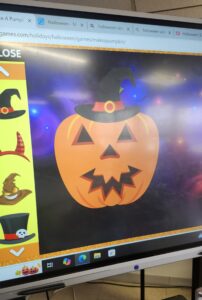
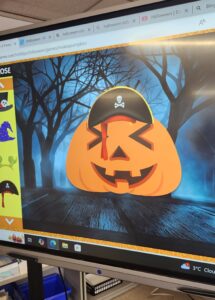
We often play online games with my students using a smart board (just look what cute pumpkins we “carved” for this year’s Halloween!). I would like to incorporate more games for learners with special needs as Michael Halpin believes that specialized educational gaming apps aimed at incentivizing productivity can help students with ADHD become more focused.

You can find this game here.

  • Speech-to-Text Tools?

One of my new students came up to me recently asking if they could use an app to transcribe what I was saying because they did not understand everything yet. I was a little surprised by this request, but I eventually approved it on the condition that they would use it temporarily as I expect the learner to try to understand my speech over time. I would not suggest all students to use such a tool because it does not support the development of the listening skills, but if some individual learners find it helpful, I would not mind granting them my permission to use it. Again, it is all about listening to each person you are teaching and finding the approaches that work specifically for them!


Although assistive technologies are becoming more and more common, we still need to be aware of the barriers to their implementation, such as lack of training for instructors, student factors, and the accessibility of specialized software or devices (Lamond & Cunningham, 2020). As a teacher, I will always do my best to create a maximally comfortable and inclusive environment for all of the learners in my class, but I realize that implementing assistive technologies takes a lot of time and team effort.

————————–

Additional Material

I was immensely inspired by this video on how assistive technologies have changed the life of a student with a learning disability, so I decided to share it with you. Such stories remind me how much assistive technologies really matter!

Posted in Uncategorized

Embracing Educational Technology: A Pathway to Inclusive Learning


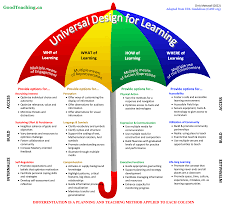
Image from Goodteaching.ca

In the ever-evolving landscape of education, the integration of various educational theories and technologies is crucial for creating an inclusive and effective learning environment. This blog post explores how Assistive Technology, Generative AI, Constructivist Theory, the Zone of Proximal Development, Behaviorism, and Collaborative Learning Theory are the foundation for learning success for students.   We will also be discussed under the umbrella of Universal Design for Learning.

Assistive Technology (AT) are tools and devices designed to support students with disabilities, enabling them to participate fully in educational activities. I would also suggest that AT can apply to all students.  All tools at our disposal should be made available to students.  All students can benefit from screen readers and speech-to-text software etc.…   All students are unique, and we need to teach them how to use educational technology tools in a manner that will help them experience success.  Generative AI which is part of AT is not only a technology that can enhance the efficiency of teaching by supporting differentiated instruction and addressing the unique needs of each student.  Furthermore, it should be noted that students need to be taught how to use the educational technology tools in a manner that will promote success in their learning journey.

Constructivist Theory presented in our class pointed out that learners construct knowledge through experiences and interactions with their environment. This approach emphasizes the importance of active learning.  It is critical that we teach students not to fall into the passive learning trap while using technology such as watching videos.  Rather, educational technology, needs to facilitate engagement by providing immersive and experiential learning opportunities.  One such activity that I have had success with is with Minecraft and in tandem with the Zone of Proximal Development theory (ZPD) refers to the range of tasks that a learner can perform with guidance but not yet independently.   Collaborative Learning Theory emphasizes the importance of social interaction and teamwork in the learning process. Have you ever asked a student to concede a digital device at school.  At times there is resistance from students to do so when using Minecraft.   Technology used in a skillful way can help teach students that they can gain insight when they not only concede their device but also their opinion on how the perceive things.  Students need to be encouraged to share ideas and to learn from each other.   Through collaboration an amazing group project in Minecraft for example can be created.   Please don’t forget the importance of behaviorism which focuses on observable behaviors and the use of reinforcement to shape learning.  Educational technology can incorporate behaviorist principles through gamified learning environments.  I have seen the level of engagement from students increase when we use gamification strategies and it is incredible to watch.

Universal Design for Learning (UDL) is a framework that aims to create flexible learning environments that accommodate the diverse needs of all students. Simply put educational technology will bring a set of new skills that teachers will learn, increased resources that are required for UDL to be successful in reaching all students.  By using educational technology as a lever, educators can ensure that UDL principles are effectively applied, making learning accessible and inclusive for all students.

Posted in Uncategorized